This Laravel jQuery POS authentication setup tutorial walks you through database migration and secure user login—critical for any protected system.
Now, we’ll make it functional by:
- Creating database tables using migrations
- Building models and controllers
- Defining routes
- Creating Blade views
- And setting up custom authentication manually—without using Laravel Breeze
By the end of this part, your POS project will have the core data structure and user login system in place.
Table of Contents
Step 1: Create Required Database Tables
The first step in your Laravel jQuery POS authentication setup is to create the required database tables for users, roles, and permissions.
Use Laravel migrations to define these structures and ensure your authentication system can store user credentials securely.
By completing this step, you’ll prepare your database for smooth login and registration in your Laravel jQuery POS authentication setup.
Open the Command Prompt (CMD), navigate to your project root directory, and run the following command:
php artisan make:migration project_tablesOverwrite the generated migration file with this content
<?php
//Laravel jQuery POS authentication setup @ https://laravelcenter.com
use Illuminate\Database\Migrations\Migration;
use Illuminate\Database\Schema\Blueprint;
use Illuminate\Support\Facades\Schema;

return new class extends Migration
{
    /**
     * Run the migrations.
     */
    public function up(): void
    {
        //  Laravel POS With jQuery @ https://laravelcenter.com
        // update existing user table
        Schema::table('users', function (Blueprint $table) {
            $table->string('username')->unique();
            $table->enum('role', ['admin', 'cashier', 'superadmin']);
            $table->boolean('active');
            $table->bigInteger('created_by_id')->default(0);
            $table->bigInteger('updated_by_id')->default(0);
            $table->bigInteger('deleted_by_id')->default(0);
            $table->dropColumn('name');
            $table->dropColumn('email');
            $table->dropColumn('email_verified_at');
            $table->softDeletes();
        });
        // tables
        Schema::create('tables', function (Blueprint $table) {
            // Set the storage engine to InnoDB
            $table->engine = 'InnoDB';
            $table->id();
            $table->string('name', 50);
            $table->tinyInteger('status')->default(2);
            $table->string('invoice_no', 20)->nullable();
            $table->tinyInteger('discount')->default(0);
            $table->decimal('total_discount')->default(0);
            $table->decimal('grand_total')->default(0);
            $table->decimal('total')->default(0);
            $table->decimal('net_amount')->default(0);
            $table->bigInteger('created_by_id')->default(0);
            $table->bigInteger('updated_by_id')->default(0);
            $table->bigInteger('deleted_by_id')->default(0);
            $table->timestamps();
            $table->softDeletes();
        });

        // product
        Schema::create('products', function (Blueprint $table) {
            $table->id();
            $table->string('name', 100);
            $table->foreignId('product_category_id');
            $table->decimal('unit_price');
            $table->string('image')->nullable();
            $table->bigInteger('created_by_id')->default(0);
            $table->bigInteger('updated_by_id')->default(0);
            $table->bigInteger('deleted_by_id')->default(0);
            $table->timestamps();
            $table->softDeletes();
        });

        // product category
        Schema::create('product_categories', function (Blueprint $table) {
            $table->id();
            $table->string('name', 50);
            $table->integer('ordering')->default(0);
            $table->bigInteger('created_by_id')->default(0);
            $table->bigInteger('updated_by_id')->default(0);
            $table->bigInteger('deleted_by_id')->default(0);
            $table->timestamps();
            $table->softDeletes();
        });

        // order
        Schema::create('orders', function (Blueprint $table) {
            // Set the storage engine to InnoDB
            $table->engine = 'InnoDB';
            $table->id();
            $table->foreignId('table_id');
            $table->string('invoice_no', 20);
            $table->integer('discount')->default(0);
            $table->decimal('total_discount')->default(0);
            $table->decimal('grand_total')->default(0);
            $table->decimal('total')->default(0);
            $table->decimal('net_amount')->default(0);
            $table->decimal('receive_amount');
            $table->bigInteger('created_by_id')->default(0);
            $table->bigInteger('updated_by_id')->default(0);
            $table->bigInteger('deleted_by_id')->default(0);
            $table->timestamps();
            $table->softDeletes();
        });

        // order detail
        Schema::create('order_details', function (Blueprint $table) {
            // Set the storage engine to InnoDB
            $table->engine = 'InnoDB';
            $table->id();
            $table->foreignId('order_id');
            $table->foreignId('product_id');
            $table->foreignId('product_category_id');
            $table->string('description', 100);
            $table->integer('qty');
            $table->decimal('unit_price');
            $table->tinyInteger('discount')->default(0);
            $table->bigInteger('created_by_id')->default(0);
            $table->bigInteger('updated_by_id')->default(0);
            $table->bigInteger('deleted_by_id')->default(0);
            $table->timestamps();
            $table->softDeletes();
        });

        // order detail temp
        Schema::create('order_detail_temps', function (Blueprint $table) {
            // Set the storage engine to InnoDB
            $table->engine = 'InnoDB';
            $table->id();
            $table->foreignId('table_id');
            $table->foreignId('product_id');
            $table->foreignId('product_category_id');
            $table->string('description', 100);
            $table->integer('qty');
            $table->decimal('unit_price');
            $table->tinyInteger('discount')->default(0);
            $table->bigInteger('created_by_id')->default(0);
            $table->bigInteger('updated_by_id')->default(0);
            $table->timestamps();
        });

        // balance adjustment
        Schema::create('balance_adjustments', function (Blueprint $table) {
            $table->id();
            $table->decimal('amount');
            $table->tinyInteger('type_id');
            $table->date('adjusted_date');
            $table->string('remark');
            $table->bigInteger('created_by_id')->default(0);
            $table->bigInteger('updated_by_id')->default(0);
            $table->bigInteger('deleted_by_id')->default(0);
            $table->timestamps();
            $table->softDeletes();
        });
    }

    /**
     * Reverse the migrations.
     */
    public function down(): void
    {
        //  Laravel POS With jQuery @ https://laravelcenter.com
        Schema::dropIfExists('tables');
        Schema::dropIfExists('products');
        Schema::dropIfExists('product_categories');
        Schema::dropIfExists('orders');
        Schema::dropIfExists('order_details');
        Schema::dropIfExists('order_detail_temps');
        Schema::dropIfExists('balance_adjustments');
    }
};
Overwrite the seeder file database/seeders/DatabaseSeeder.php with this content
<?php
// Laravel jQuery POS authentication setup @ https://laravelcenter.com
namespace Database\Seeders;

use Illuminate\Database\Seeder;
use Illuminate\Support\Facades\DB;

class DatabaseSeeder extends Seeder
{
    /**
     * Seed the application's database.
     */
    public function run(): void
    {
        //  Laravel POS With jQuery @ https://laravelcenter.com

        // create default users
        DB::table('users')->insert([
            'username' => 'superadmin',
            'password' => bcrypt('123456'),
            'role' => 'superadmin',
            'active' => 1,
            'created_at' => date('Y-m-d H:i:s'),
            'updated_at' => date('Y-m-d H:i:s')
        ]);
        DB::table('users')->insert([
            'username' => 'admin',
            'password' => bcrypt('123456'),
            'role' => 'admin',
            'active' => 1,
            'created_at' => date('Y-m-d H:i:s'),
            'updated_at' => date('Y-m-d H:i:s')
        ]);
        DB::table('users')->insert([
            'username' => 'cashier',
            'password' => bcrypt('123456'),
            'role' => 'cashier',
            'active' => 1,
            'created_at' => date('Y-m-d H:i:s'),
            'updated_at' => date('Y-m-d H:i:s')
        ]);

        // insert dummy product category
        $dummyProducts = [
            'Rice' => [
                [
                    'name' => 'Pork Rice',
                    'unit_price' => 2
                ],
                [
                    'name' => 'Chicken Rice',
                    'unit_price' => 2
                ],
                [
                    'name' => 'Fried Rice',
                    'unit_price' => 2
                ]
            ],
            'Noodle' => [
                [
                    'name' => 'Beef Noodle Soup',
                    'unit_price' => 3
                ],
                [
                    'name' => 'Seafood Noodle Soup',
                    'unit_price' => 3
                ]
            ],
            'Snack' => [
                [
                    'name' => 'Fried Chicken',
                    'unit_price' => 1
                ],
                [
                    'name' => 'French Fries',
                    'unit_price' => 1
                ],
                [
                    'name' => 'Burger',
                    'unit_price' => 1
                ]
            ],
            'Water' => [
                [
                    'name' => 'Eau Kulen',
                    'unit_price' => 0.25
                ],
                [
                    'name' => 'Angkor Puro',
                    'unit_price' => 0.25
                ],
                [
                    'name' => 'Dasani',
                    'unit_price' => 0.25
                ]
            ],
            'Coffee' => [
                [
                    'name' => 'Iced Latte',
                    'unit_price' => 1.5
                ],
                [
                    'name' => 'Iced Cappuccino',
                    'unit_price' => 1.5
                ],
                [
                    'name' => 'Iced Americano',
                    'unit_price' => 1.5
                ]
            ],
            'Beer & Wine' => [
                [
                    'name' => 'ABC',
                    'unit_price' => 2
                ],
                [
                    'name' => 'Tiger',
                    'unit_price' => 2
                ],
                [
                    'name' => 'Heineken',
                    'unit_price' => 2
                ]
            ],
            'Juice' => [
                [
                    'name' => 'Orange Juice',
                    'unit_price' => 2
                ],
                [
                    'name' => 'Apple Juice',
                    'unit_price' => 2
                ],
                [
                    'name' => 'Mango Juice',
                    'unit_price' => 2
                ]
            ],
        ];

        foreach ($dummyProducts as $key => $value) {
            $categoryId = DB::table('product_categories')->insertGetId([
                'name' => $key,
                'created_at' => date('Y-m-d H:i:s'),
                'updated_at' => date('Y-m-d H:i:s')
            ]);
            foreach ($value as $product) {
                DB::table('products')->insert([
                    'name' => $product['name'],
                    'unit_price' => $product['unit_price'],
                    'product_category_id' => $categoryId,
                    'created_at' => date('Y-m-d H:i:s'),
                    'updated_at' => date('Y-m-d H:i:s')
                ]);
            }
        }
        // Dummy Table
        for ($i = 1; $i <= 10; $i++) {
            DB::table('tables')->insert([
                'name' => str_pad($i, 3, '0', STR_PAD_LEFT),
                'created_at' => date('Y-m-d H:i:s'),
                'updated_at' => date('Y-m-d H:i:s')
            ]);
        }
    }
}
Then run the migration:
php artisan migrate:fresh --seedNote:
After running this command, Laravel will generate all the required project tables along with sample data for products and their categories. Additionally, three default user accounts will be created for testing:
- Username:
superadmin| Password:123456 - Username:
admin| Password:123456 - Username:
cashier| Password:123456
These users can be used to log in and test different access levels within the system.
To learn more about Laravel’s migration system, you can check out the official Laravel migration documentation.
Step 2: Setup Laravel Controllers
Next, you’ll create the controllers that handle user authentication logic in your Laravel jQuery POS authentication setup.
These controllers manage key features such as user registration, login, logout, and password validation.
Building controllers properly ensures your Laravel jQuery POS authentication setup functions efficiently and follows Laravel best practices.
Replace the contents of app/Http/Controllers/UserController.php with the code below. If the file doesn’t exist yet, please create it.
<?php
// Laravel jQuery POS authentication setup @ https://laravelcenter.com
namespace App\Http\Controllers;

use Illuminate\Http\Request;
use Illuminate\Support\Facades\Auth;
use Illuminate\Support\Facades\Validator;

class UserController extends Controller
{
    /**
     * Handle an authentication attempt.
     */
    public function login(Request $request)
    {
        if ($request->isMethod('GET'))
            return view('user.login');

        // validation
        $rules = [
            'username' => 'required',
            'password' => 'required'
        ];
        $validator = Validator::make($request->all(), $rules);
        if ($validator->fails())
            return response()->json([
                'success' => false,
                'errors' => $validator->errors()
            ]);

        $credentials = [
            'username' => $request->username,
            'password' => $request->password,
            'active' => 1,
        ];

        if (Auth::attempt($credentials)) {
            $request->session()->regenerate();
            // check page need to redirect base on user menu
            return response()->json([
                'success' => true,
                'redirect_url' => url('/')
            ]);
        }
        return response()->json([
            'success' => false,
            'errors' => [
                'username' => ['Incorrect username or password']
            ]
        ]);
    }

    /**
     * Log the user out of the application.
     */
    public function logout(Request $request)
    {
        Auth::logout();

        $request->session()->invalidate();
        $request->session()->regenerateToken();

        return redirect('/');
    }
}
Step 3: Setup Blade Views
Now it’s time to design the frontend for your Laravel jQuery POS authentication setup using Blade templates.
Create simple and responsive login, registration, and dashboard pages styled with Bootstrap and jQuery.
This step makes your Laravel jQuery POS authentication setup user-friendly and visually consistent with your POS admin design.
Replace the contents of resources/views/layout/admin.blade.php with the code below. If the file doesn’t exist yet, please create it.
<!DOCTYPE html>
<html lang="{{ str_replace('_', '-', app()->getLocale()) }}">
{{-- Laravel jQuery POS authentication setup @ https://laravelcenter.com --}}
<head>
    <meta charset="utf-8">
    <meta name="viewport" content="width=device-width, initial-scale=1">
    <meta name="csrf-token" content="{{ csrf_token() }}">
    <link rel="icon" type="image/png" href="images/favicon.png">
    <title>{{ env('APP_NAME') }}</title>
    <!-- Google Fonts -->
    <link href="https://fonts.gstatic.com" rel="preconnect">
    <link
        href="https://fonts.googleapis.com/css?family=Open+Sans:300,300i,400,400i,600,600i,700,700i|Nunito:300,300i,400,400i,600,600i,700,700i|Poppins:300,300i,400,400i,500,500i,600,600i,700,700i"
        rel="stylesheet">
    @vite('resources/js/app.js')
</head>

<body style="display: none">
    {{-- Header Menu --}}
    <header id="header" class="header fixed-top d-flex align-items-center">

        <div class="d-flex align-items-center justify-content-between">
            <a href="{{ url('/') }}" class="logo d-flex align-items-center">
                <img src="images/logo.png" alt="">
            </a>
            <i class="bi bi-list toggle-sidebar-btn"></i>
        </div>

        <nav class="header-nav ms-auto">
            <ul class="d-flex align-items-center">
                <li class="d-none d-md-inline-block form-inline ms-auto nav-item dropdown me-5">
                    <i class="bi bi-alarm-fill text-secondary pe-2"></i>
                    <span class="text-secondary">{{ date('d-M-Y H:i:s') }}</span>
                </li>
                <li class="nav-item dropdown pe-3">
                    <a class="nav-link nav-profile d-flex align-items-center pe-0" href="#"
                        data-bs-toggle="dropdown">
                        <i class="bi bi-person-fill" style="font-size: 35px;"></i>
                        <span
                            class="d-none d-md-block dropdown-toggle ps-2">{{ ucwords(request()->user()?->username) }}</span>
                    </a>
                    <ul class="dropdown-menu dropdown-menu-end dropdown-menu-arrow profile">
                        <li>
                            <button class="dropdown-item d-flex align-items-center"
                                onclick="ajaxPopup(`{{ url('user/change-password') }}`)">
                                <i class="bi bi-shield-lock"></i>
                                <span>Change Password</span>
                            </button>
                        </li>
                        <li>
                            <hr class="dropdown-divider">
                        </li>
                        <li>
                            <form method="post" action="{{ url('./user/logout') }}">
                                @csrf
                                <button type="submit" class="dropdown-item d-flex align-items-center">
                                    <i class="bi bi-box-arrow-right"></i>
                                    <span>Sign Out</span>
                                </button>
                            </form>
                        </li>
                    </ul>
                </li>
            </ul>
        </nav>

    </header>

    {{-- Sidebar --}}
    <aside id="sidebar" class="sidebar">
        <ul class="sidebar-nav" id="sidebar-nav">
            <li class="nav-item">
                <a href="#dashboard" class="nav-link collapsed">
                    <i class="bi bi-speedometer2"></i>
                    <span>Dashboard</span>
                </a>
            </li>
            <li class="nav-heading">Main Data</li>
            <li class="nav-item">
                <a href="#table" class="nav-link collapsed">
                    <i class="bi bi-grid-3x3-gap"></i>
                    <span>Table</span>
                </a>
            </li>
            <li class="nav-item">
                <a href="#product" class="nav-link collapsed">
                    <i class="bi bi-list-ul"></i>
                    <span>Product</span>
                </a>
            </li>
            <li class="nav-item">
                <a href="#product-category" class="nav-link collapsed">
                    <i class="bi bi-grid"></i>
                    <span>Product Category</span>
                </a>
            </li>
            <li class="nav-heading">Operation</li>
            <li class="nav-item">
                <a href="#balance-adjustment" class="nav-link collapsed">
                    <i class="bi bi-coin"></i>
                    <span>Balance Adjustment</span>
                </a>
            </li>
            <li class="nav-heading">Report</li>
            <li class="nav-item">
                <a href="#report/sale-summary" class="nav-link collapsed">
                    <i class="bi bi-graph-up-arrow"></i>
                    <span>Sale Summary</span>
                </a>
            </li>
            <li class="nav-item">
                <a href="#report/product-summary" class="nav-link collapsed">
                    <i class="bi bi-clipboard-data"></i>
                    <span>Product Summary</span>
                </a>
            </li>
            <li class="nav-item">
                <a href="#report/sale-history" class="nav-link collapsed">
                    <i class="bi bi-clock-history"></i>
                    <span>Sale History</span>
                </a>
            </li>
            <li class="nav-heading">System Setting</li>
            <li class="nav-item">
                <a href="#user" class="nav-link collapsed">
                    <i class="bi bi-people"></i>
                    <span>System User</span>
                </a>
            </li>
        </ul>
    </aside>
    <main id="main" class="main">
        <div id="content">
            <div class="pagetitle">
                <h1>Dashboard</h1>
            </div>
        </div>
    </main>
</body>

</html>
Replace the contents of resources/views/user/login.blade.php with the code below. If the file doesn’t exist yet, please create it.
<!DOCTYPE html>
<html lang="{{ str_replace('_', '-', app()->getLocale()) }}">
{{-- Laravel jQuery POS authentication setup @ https://laravelcenter.com  --}}
<head>
    <meta charset="utf-8">
    <meta name="viewport" content="width=device-width, initial-scale=1">
    <link rel="icon" type="image/png" href="images/favicon.png">
    <title>{{ env('APP_NAME') }}</title>
    <!-- Google Fonts -->
    <link href="https://fonts.gstatic.com" rel="preconnect">
    <link
        href="https://fonts.googleapis.com/css?family=Open+Sans:300,300i,400,400i,600,600i,700,700i|Nunito:300,300i,400,400i,600,600i,700,700i|Poppins:300,300i,400,400i,500,500i,600,600i,700,700i"
        rel="stylesheet">
    @vite(['resources/js/app.js'])
</head>

<body style="display: none;">
    <div class="loading"></div>
    <section class="vh-100"
        style="background-image: url('images/bg.jpg');background-position: center; background-repeat: no-repeat; background-size: cover;">
        <div class="container py-5 h-100">
            <div class="row d-flex justify-content-center align-items-center h-100">
                <div class="col-12 col-md-8 col-lg-6 col-xl-5">
                    <div class="card shadow-2-strong" style="border-radius: 1rem; background: lightsteelblue;">
                        <div class="card-body p-5">
                            <img src="./images/favicon.png"
                                style="position: absolute; top: 10px; left: 10px; height: 80px;" />
                            <h1 class="mb-4 text-center fw-bold">Sign In</h1>
                            <form id="frmLogin" method="post" action="{{ url('./login') }}">
                                @csrf
                                <div class="form-outline mb-4">
                                    <input type="text" class="form-control form-control-lg" placeholder="Username"
                                        id="username" name="username" autofocus />
                                </div>

                                <div class="form-outline mb-4">
                                    <input type="password" class="form-control form-control-lg" placeholder="Password"
                                        id="password" name="password" />
                                </div>
                                <div class="d-grid mb-2">
                                    <button class="btn btn-primary btn-lg" type="submit">
                                        Login
                                    </button>
                                </div>
                            </form>
                        </div>
                    </div>
                </div>
            </div>
        </div>
    </section>
</body>
<script>
    document.addEventListener('DOMContentLoaded', function() {
        $("body").show();
        $("input[autofocus]").focus();
        $(document).on("submit", "form#frmLogin", function(event) {
            event.preventDefault();
            $(".loading").show();
            var form = $(this);
            var data = new FormData(form[0]);
            var url = form.attr("action");
            $.ajaxSetup({
                headers: {
                    "X-CSRF-TOKEN": $('meta[name="csrf-token"]').attr("content"),
                },
            });
            $.ajax({
                type: "POST",
                url: url,
                data: data,
                cache: false,
                contentType: false,
                processData: false,
                success: function(data) {
                    $(".is-invalid").removeClass("is-invalid");
                    $("span.invalid-feedback").remove();
                    if (!data.success) {
                        for (var control in data.errors) {
                            $("#" + control).addClass("is-invalid");
                            $(
                                "<span class='invalid-feedback'>" +
                                data.errors[control] +
                                "</span>"
                            ).insertAfter($("#" + control));
                        }
                        $("input[autofocus]").focus();
                    } else {
                        window.location.href = '/';
                    }
                    $(".loading").hide();
                },
                error: function(xhr, textStatus, errorThrown) {
                    alert("Error: " + errorThrown);
                },
            });
            return false;
        });
    });
</script>

</html>
Replace the contents of resources/views/404.blade.php with the code below. If the file doesn’t exist, create it manually. This view will be used for the fallback route when no other routes match.
<!DOCTYPE html>
<html lang="{{ str_replace('_', '-', app()->getLocale()) }}">
{{-- Laravel jQuery POS authentication setup @ https://laravelcenter.com   --}}
<head>
    <meta charset="utf-8">
    <meta name="viewport" content="width=device-width, initial-scale=1">
    <link rel="icon" type="image/png" href="images/favicon.png">
    <title>{{ env('APP_NAME') }}</title>
    <!-- Google Fonts -->
    <link href="https://fonts.gstatic.com" rel="preconnect">
    <link
        href="https://fonts.googleapis.com/css?family=Open+Sans:300,300i,400,400i,600,600i,700,700i|Nunito:300,300i,400,400i,600,600i,700,700i|Poppins:300,300i,400,400i,500,500i,600,600i,700,700i"
        rel="stylesheet">
    @vite(['resources/js/app.js', 'resources/css/app.css', 'resources/css/admin.css'])
</head>

<body style="display: none;">
    <div class="container">
        <section class="section error-404 min-vh-100 d-flex flex-column align-items-center justify-content-center">
            <h1>404</h1>
            <h2>The page you are looking for doesn't exist.</h2>
            <a class="btn" href="{{ url('/') }}">Back to home</a>
            <img src="{{ url('images/not-found.svg') }}" class="img-fluid" alt="Page Not Found">
        </section>
    </div>
</body>
Step 4: Define Laravel Routes
In this step, you’ll define all routes that connect your controllers and Blade views for the Laravel jQuery POS authentication setup.
Routes allow your POS system to handle user requests like logging in or registering new accounts.
By organizing these routes clearly, your Laravel jQuery POS authentication setup will remain maintainable and scalable.
Replace the contents of routes/web.php with the code below
<?php
//  Laravel jQuery POS authentication setup @ https://laravelcenter.com

use App\Http\Controllers\UserController;
use Illuminate\Support\Facades\Route;

Route::middleware('guest')->match(['get', 'post'], '/login', [UserController::class, 'login'])->name('login');

Route::middleware('auth')->group(function () {
    Route::post('/user/logout', [UserController::class, 'logout']);

    Route::get('/', function () {
        return view('layout.admin');
    });
});
Route::fallback(function () {
    return view('404');
});
Running and Testing Your Project
After creating your views and routes, compile all frontend assets to make your Laravel jQuery POS authentication setup fully functional.
Use Vite or Laravel Mix to bundle JavaScript and CSS for your authentication pages.
This ensures your Laravel jQuery POS authentication setup loads faster and provides a smoother user experience.
Open your Terminal/CMD in separate windows, go to the project’s root folder, and then run the command below:
npm run devphp artisan serveWith both commands running in their separate windows, open your web browser to the Laravel address (http://127.0.0.1:8000).
You should now see your Laravel POS with jQuery project running with the database tables, sample data, and a basic login system ready for upcoming features.
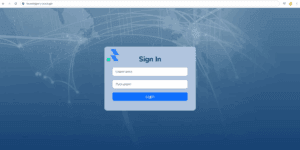
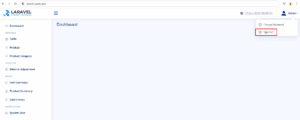
Please use this default account to log in
- Username:
superadmin| Password:123456 - Username:
admin| Password:123456 - Username:
cashier| Password:123456
Database & Authentication Setup Complete
Congratulations! You’ve successfully completed the Laravel jQuery POS authentication setup.
Your Laravel project now includes secure login, registration, and database integration.
With the Laravel jQuery POS authentication setup done, you’re ready to move on to implementing role-based access and cashier management features.
In the next tutorial, we’ll move on to building CRUD functionality for managing products, categories, tables, users, and balance adjustment. You’ll learn how to create, edit, and delete records using Laravel’s powerful tools—bringing your POS system to life.
👉 Continue to Part 4: Ajax Menu Navigation and System Data (CRUD)
Laravel jQuery POS Tutorial for Beginners Series
This step-by-step series will guide you through building a complete Laravel jQuery POS system from scratch:
- Part 1: Install Laravel and Required Packages
Set up Laravel 12.x, jQuery, Bootstrap, and essential dependencies to get your project started. - Part 2: Integrate NiceAdmin Template into Laravel
Design a clean and responsive UI using the NiceAdmin Bootstrap template. - Part 3: Data Migration and Authentication
Implement user login, logout, and role-based access control. - Part 4: Ajax Menu Navigation and System Data (CRUD)
Create smooth navigation and manage key POS data with simple Ajax-based CRUD features. - Part 5: Build the POS Cart System with jQuery
Add products to cart, adjust quantities, and calculate totals with jQuery. - Part 6: Role-Based Access – Admin vs. Cashier
Create middleware to manage access between different user roles. - Part 7: Generate Reports and Filter Sales Data
Show daily sales, filter by date, and export reports using xlsx-populate. - Part 8: Create Graph Reports with ApexCharts
Visualize sales performance using beautiful charts on the dashboard.