This Laravel jQuery POS sales reports tutorial helps you build a filterable sales reporting system that provides clarity on daily performance.
In this part, you’ll build a Sales Report feature that allows users to filter transactions by date and export the data to Excel. This is essential for business owners or managers who want to review daily, weekly, or monthly sales performance.
To make the experience more user-friendly, we’ll use:
- Flatpickr – a lightweight date picker for selecting custom date ranges.
- Xlsx-Populate – a powerful JavaScript library to export Excel files with custom headers and formatting.
By the end of this tutorial, your POS system will include a complete reporting module, giving your users easy access to filtered data and downloadable reports — all without leaving the browser.
Table of Contents
Step 1: Import with Flatpickr and Xlsx-Populate for POS Sales Reports
Check your JavaScript file resources/js/app.js and make sure you’ve imported both flatpickr and xlsx-populate. These libraries are required for date filtering and exporting reports to Excel in your Laravel POS with jQuery app.
// ...
import XlsxPopulate from "xlsx-populate/browser/xlsx-populate";
import flatpickr from "flatpickr";
import "flatpickr/dist/flatpickr.min.css";

window.XlsxPopulate = XlsxPopulate;

// ...
Step 2: Build the Controller
Next, we’ll create a controller method to handle AJAX requests. It will receive the selected date range, query the database for matching records, and return the data as JSON for display and export.
Replace the contents of app/Http/Controllers/ReportController.php with the code below. If the file doesn’t exist yet, please create it.
<?php
// Laravel jQuery POS Sales Reports @ https://laravelcenter.com
namespace App\Http\Controllers;

use App\Models\Order;
use App\Models\ProductCategory;
use Illuminate\Http\Request;
use Illuminate\Support\Facades\DB;

class ReportController extends Controller
{

    public function saleSummary(Request $request)
    {
        session()->put('sale_summary_fd', $request->get('sale_summary_fd', session('sale_summary_fd', date('Y-m-d'))));
        session()->put('sale_summary_td', $request->get('sale_summary_td', session('sale_summary_td', date('Y-m-d'))));

        $list = Order::join('order_details', 'orders.id', '=', 'order_details.order_id')
            ->join('product_categories', 'product_categories.id', '=', 'order_details.product_category_id')
            ->select(DB::raw("product_categories.name,sum((order_details.qty * order_details.unit_price*order_details.discount/100) + (order_details.qty * order_details.unit_price * (1-order_details.discount/100) * orders.discount/100)) as discount, sum(order_details.qty * order_details.unit_price) as total"))
            ->when(session('sale_summary_fd'), function ($query) {
                $query->where('orders.created_at', '>=', date('Y-m-d 00:00:00', strtotime(session('sale_summary_fd'))));
            })
            ->when(session('sale_summary_td'), function ($query) {
                $query->where('orders.created_at', '<=', date('Y-m-d 23:59:59', strtotime(session('sale_summary_td'))));
            })
            ->groupBy(DB::raw('product_categories.name'))
            ->orderBy('product_categories.name', 'DESC')
            ->get();

        // return back to compoment
        return view('report.sale_summary', compact('list'));
    }

    public function productSummary(Request $request)
    {
        // get param value
        session()->put('product_summary_category_id', $request->get('product_summary_category_id', session('product_summary_category_id', 0)));
        session()->put('product_summary_fd', $request->get('product_summary_fd', session('product_summary_fd', date('Y-m-d'))));
        session()->put('product_summary_td', $request->get('product_summary_td', session('product_summary_td', date('Y-m-d'))));

        // select from table with filter, sort, and paginate
        $list = Order::join('order_details', 'order_details.order_id', '=', 'orders.id')->join('product_categories', 'product_categories.id', '=', 'order_details.product_category_id')
            ->selectRaw('order_details.description,order_details.product_category_id,product_categories.name AS category_name,sum(order_details.qty) AS qty')
            ->when(session('product_summary_fd'), function ($query) {
                $query->where('orders.created_at', '>=', date('Y-m-d 00:00:00', strtotime(session('product_summary_fd'))));
            })
            ->when(session('product_summary_td'), function ($query) {
                $query->where('orders.created_at', '<=', date('Y-m-d 23:59:59', strtotime(session('product_summary_td'))));
            })
            ->when(session('product_summary_category_id'), function ($query) {
                $query->where('order_details.product_category_id',  session('product_summary_category_id'));
            })
            ->groupBy('order_details.description', 'order_details.product_category_id', 'product_categories.name')
            ->orderBy(DB::raw('sum(order_details.qty)'), 'DESC')
            ->paginate(50);

        // product category list
        $product_categories = ProductCategory::all(['id', 'name']);
        // return back to compoment
        return view('report.product_summary', compact('list', 'product_categories'));
    }

    public function exportProductSummary()
    {
        // select from table with filter, sort, and paginate
        $list = Order::join('order_details', 'order_details.order_id', '=', 'orders.id')->join('product_categories', 'product_categories.id', '=', 'order_details.product_category_id')
            ->selectRaw('order_details.description,order_details.product_category_id,product_categories.name AS category_name,sum(order_details.qty) AS qty')
            ->when(session('product_summary_fd'), function ($query) {
                $query->where('orders.created_at', '>=', date('Y-m-d 00:00:00', strtotime(session('product_summary_fd'))));
            })
            ->when(session('product_summary_td'), function ($query) {
                $query->where('orders.created_at', '<=', date('Y-m-d 23:59:59', strtotime(session('product_summary_td'))));
            })
            ->when(session('product_summary_category_id'), function ($query) {
                $query->where('order_details.product_category_id',  session('product_summary_category_id'));
            })
            ->groupBy('order_details.description', 'order_details.product_category_id', 'product_categories.name')
            ->orderBy(DB::raw('sum(order_details.qty)'), 'DESC')
            ->get();

        // return back to compoment
        return response()->json($list);
    }

    public function saleHistory(Request $request)
    {
        // get param value
        session()->put('sale_history_invoice_no', $request->get('sale_history_invoice_no', session('sale_history_invoice_no')));
        session()->put('sale_history_fd', $request->get('sale_history_fd', session('sale_history_fd', date('Y-m-d'))));
        session()->put('sale_history_td', $request->get('sale_history_td', session('sale_history_td', date('Y-m-d'))));
        session()->put('sale_history_field', $request->get('sale_history_field', session('sale_history_field', 'orders.created_at')));
        session()->put('sale_history_order', $request->get('sale_history_order', session('sale_history_order', 'desc')));

        $list = Order::join('tables', 'tables.id', '=', 'orders.table_id')
            ->join('users', 'users.id', '=', 'orders.created_by_id')
            ->select(
                'orders.invoice_no',
                'tables.name AS table_name',
                'orders.grand_total',
                'orders.total_discount',
                'orders.net_amount',
                'orders.id',
                'orders.created_at',
                DB::raw('users.username AS cashier')
            )
            ->when(session('sale_history_fd'), function ($query) {
                $query->where('orders.created_at', '>=', date('Y-m-d 00:00:00', strtotime(session('sale_history_fd'))));
            })
            ->when(session('sale_history_td'), function ($query) {
                $query->where('orders.created_at', '<=', date('Y-m-d 23:59:59', strtotime(session('sale_history_td'))));
            })
            ->when(session('sale_history_invoice_no'), function ($query) {
                $query->where('orders.invoice_no', 'like', '%' . session('sale_history_invoice_no') . '%');
            })
            ->orderBy(session('sale_history_field'), session('sale_history_order'))
            ->paginate(50);

        $sale_summary = $this->saleHistorySummary($request);
        // return back to compoment
        return view('report.sale_history', compact('list', 'sale_summary'));
    }

    private function saleHistorySummary()
    {
        $data = Order::select(DB::raw("sum(grand_total) as grand_total, sum(total_discount) as total_discount, sum(net_amount) as net_amount"))
            ->when(session('sale_history_fd'), function ($query) {
                $query->where('created_at', '>=', date('Y-m-d 00:00:00', strtotime(session('sale_history_fd'))));
            })
            ->when(session('sale_history_td'), function ($query) {
                $query->where('created_at', '<=', date('Y-m-d 23:59:59', strtotime(session('sale_history_td'))));
            })
            ->when(session('sale_history_invoice_no'), function ($query) {
                $query->where('invoice_no', 'like', '%' . session('sale_history_invoice_no') . '%');
            })->first();

        return $data;
    }

    public function exportSaleHistory()
    {
        $data = Order::join('tables', 'tables.id', '=', 'orders.table_id')
            ->join('users', 'users.id', '=', 'orders.created_by_id')
            ->select(
                'orders.invoice_no',
                'tables.name AS table_name',
                DB::raw('DATE_FORMAT(orders.created_at, "%d-%b-%Y %H:%i:%s") AS order_date'),
                'orders.grand_total',
                'orders.total_discount',
                'orders.net_amount',
                'orders.created_by_id',
                DB::raw('users.username AS cashier')
            )
            ->when(session('sale_history_fd'), function ($query) {
                $query->where('orders.created_at', '>=', date('Y-m-d 00:00:00', strtotime(session('sale_history_fd'))));
            })
            ->when(session('sale_history_td'), function ($query) {
                $query->where('orders.created_at', '<=', date('Y-m-d 23:59:59', strtotime(session('sale_history_td'))));
            })
            ->when(session('sale_history_invoice_no'), function ($query) {
                $query->where('orders.invoice_no', 'like', '%' . session('sale_history_invoice_no') . '%');
            })
            ->orderBy(session('sale_history_field'), session('sale_history_order'))
            ->get();

        return response()->json($data);
    }
    public function showOrderDetail($id)
    {
        $data = Order::with('order_details')->join('tables', 'tables.id', '=', 'orders.table_id')
            ->join('users', 'users.id', '=', 'orders.created_by_id')
            ->select(
                'orders.total',
                'orders.net_amount',
                'orders.discount',
                'orders.invoice_no',
                'tables.name AS table_name',
                'orders.created_at',
                'orders.id',
                'orders.created_by_id',
                'orders.receive_amount',
                DB::raw('users.username AS cashier')
            )
            ->find($id);

        return view('report.order_detail', compact('data'));
    }
}
Step 3: Setup View for Laravel jQuery POS Sales Reports
Here we’ll build the actual report UI. It includes:
- Flatpickr input fields for the start and end dates.
- A data table to display the filtered results.
- An Export to Excel button that uses
xlsx-populateto generate a downloadable.xlsxfile with dynamic headers and content.
Replace the contents of resources/views/report/sale_summary.blade.php with the code below. If the file doesn’t exist yet, please create it.
    {{-- Laravel jQuery POS Sales Reports @ https://laravelcenter.com --}}
    <div class="pagetitle">
        <h1>Sale Summary</h1>
    </div>
    <section class="section">
        <div class="col">
            <div class="card">
                <div class="card-body">
                    <form method="get" id="search_form" action="{{ url('/report/sale-summary') }}">
                        <div class="row pt-4">
                            <div class="col-md-10">
                                <div class="row justify-content-start">
                                    <div class="col-lg-3 col-sm-6">
                                        <label class="form-label" for="sale_summary_fd">From Date</label>
                                        <input type="text" id="sale_summary_fd" name="sale_summary_fd" value="{{session('sale_summary_fd')}}" class="form-control" />
                                    </div>
                                    <div class="col-lg-3 col-sm-6">
                                        <label class="form-label" for="sale_summary_td">To Date</label>
                                        <input type="text" id="sale_summary_td" name="sale_summary_td" value="{{session('sale_summary_td')}}" class="form-control" />
                                    </div>
                                </div>
                            </div>
                            <div class="col-md-2 align-self-end">
                                <button type="submit" class="btn btn-secondary pt-1" style="float: right">
                                    <i class="bi bi-search"></i> Search
                                </button>
                            </div>
                        </div>
                    </form>
                    <hr class="text-secondary" />
                    @php
                    $total_amount = 0;
                    $total_discount = 0;
                    $net_amount = 0;
                    foreach($list as $value){
                    $total_amount += $value->total;
                    $total_discount += $value->discount;
                    }
                    $net_amount = $total_amount - $total_discount;
                    @endphp
                    <table class="table shadow mb-4">
                        <thead>
                            <tr class="table-dark">
                                <th class="text-center">
                                    Total Amount
                                </th>
                                <th class="text-center">
                                    Total Discount
                                </th>
                                <th class="text-center">
                                    Net Amount
                                </th>
                            </tr>
                        </thead>
                        <tbody>
                            <tr class="fs-4">
                                <th class="text-center text-primary">
                                    $ {{ number_format($total_amount,2) }}
                                </th>
                                <th class="text-center text-danger">
                                    $ {{ number_format($total_discount,2) }}
                                </th>
                                <th class="text-center text-success">
                                    $ {{ number_format($net_amount,2) }}
                                </th>
                            </tr>
                        </tbody>
                    </table>
                    <table class="table shadow">
                        <thead>
                            <tr class="table-dark">
                                <th>Product Category</th>
                                <th class="text-end" width="300px">Total Amount</th>
                                <th class="text-end" width="300px">Total Discount</th>
                                <th class="text-end" width="300px">Net Amount</th>
                            </tr>
                        </thead>
                        <tbody>
                            @if($list->count()>0)
                            @foreach($list as $value)
                            <tr>
                                <td>{{ $value->name }}</td>
                                <td class="text-end">$ {{ number_format($value->total,2) }}</td>
                                <td class="text-end">$ {{ number_format($value->discount,2) }}</td>
                                <td class="text-end">$ {{ number_format($value->total - $value->discount,2) }}</td>
                            </tr>
                            @endforeach
                            @else
                            <tr>
                                <td colspan="10" class="shadow-none">
                                    No record found
                                </td>
                            </tr>
                            @endif
                        </tbody>
                    </table>
                </div>
            </div>
        </div>
    </section>
    <script>
        $(document).ready(function() {
            const $start = $("#sale_summary_fd");
            const $end = $("#sale_summary_td");

            const startPicker = flatpickr($start, {
                altFormat: "d-M-Y",
                altInput: true,
                onChange: function(selectedDates, dateStr, instance) {
                    if (dateStr) {
                        endPicker.set('minDate', dateStr);
                    }
                }
            });

            const endPicker = flatpickr($end, {
                altFormat: "d-M-Y",
                altInput: true,
                onChange: function(selectedDates, dateStr, instance) {
                    if (dateStr) {
                        startPicker.set('maxDate', dateStr);
                    }
                }
            });
        });
    </script>
Replace the contents of resources/views/report/product_summary.blade.php with the code below. If the file doesn’t exist yet, please create it.
    {{-- Laravel jQuery POS Sales Reports @ https://laravelcenter.com --}}
    <button type="button" class="btn btn-success" style="float: right" onclick="exportToExcel()">
        <i class="bi bi-file-earmark-excel"></i> Export to Excel
    </button>

    <div class="pagetitle">
        <h1>Product Summary</h1>
    </div>
    <section class="section">
        <div class="col">
            <div class="card">
                <div class="card-body">
                    <form method="get" id="search_form" action="{{ url('/report/product-summary') }}">
                        <div class="row pt-4">
                            <div class="col-md-10">
                                <div class="row justify-content-start">
                                    <div class="col-lg-3 col-sm-6">
                                        <label for="product_summary_category_id" class="form-label">Category</label>
                                        <select id="product_summary_category_id" name="product_summary_category_id" class="form-select">
                                            <option value="0"
                                                {{ session('product_summary_category_id') == 0 ? 'selected' : '' }}>
                                                ALL
                                            </option>
                                            @foreach ($product_categories as $category)
                                            <option value="{{ $category->id }}"
                                                {{ session('product_summary_category_id') == $category->id ? 'selected' : '' }}>
                                                {{ $category->name }}
                                            </option>
                                            @endforeach
                                        </select>
                                    </div>
                                    <div class="col-lg-3 col-sm-6">
                                        <label class="form-label" for="product_summary_fd">From Date</label>
                                        <input type="text" id="product_summary_fd" name="product_summary_fd" value="{{session('product_summary_fd')}}" class="form-control" />
                                    </div>
                                    <div class="col-lg-3 col-sm-6">
                                        <label class="form-label" for="product_summary_td">To Date</label>
                                        <input type="text" id="product_summary_td" name="product_summary_td" value="{{session('product_summary_td')}}" class="form-control" />
                                    </div>
                                </div>
                            </div>
                            <div class="col-md-2 align-self-end">
                                <button type="submit" class="btn btn-secondary pt-1" style="float: right">
                                    <i class="bi bi-search"></i> Search
                                </button>
                            </div>
                        </div>
                    </form>
                    <hr class="text-secondary" />
                    <table class="table table-striped">
                        <thead>
                            <tr class="table-dark">
                                <th style="width: 50px">#</th>
                                <th>Product Name</th>
                                <th>Product Category</th>
                                <th class="text-end">Quantity</th>
                            </tr>
                        </thead>
                        <tbody>
                            @if($list->count()>0)
                            @foreach($list as $index => $value)
                            <tr>
                                <th scope="row">{{ $list->perPage() * ($list->currentPage() - 1) + ($index + 1) }}</th>
                                <td>{{ $value->description }}</td>
                                <td>{{ $value->category_name }}</td>
                                <td class="text-end">{{ $value->qty }}</td>
                            </tr>
                            @endforeach
                            @else
                            <tr>
                                <td colspan="10" class="shadow-none">
                                    No record found
                                </td>
                            </tr>
                            @endif
                        </tbody>
                    </table>
                    <div class="d-flex justify-content-end">
                        <nav>
                            <ul class="pagination justify-content-end">
                                {{ $list->links() }}
                            </ul>
                        </nav>
                    </div>
                </div>
            </div>
        </div>
    </section>
    <script>
        $(document).ready(function() {
            const $start = $("#product_summary_fd");
            const $end = $("#product_summary_td");

            const startPicker = flatpickr($start, {
                altFormat: "d-M-Y",
                altInput: true,
                onChange: function(selectedDates, dateStr, instance) {
                    if (dateStr) {
                        endPicker.set('minDate', dateStr);
                    }
                }
            });

            const endPicker = flatpickr($end, {
                altFormat: "d-M-Y",
                altInput: true,
                onChange: function(selectedDates, dateStr, instance) {
                    if (dateStr) {
                        startPicker.set('maxDate', dateStr);
                    }
                }
            });

            window.exportToExcel = () => {
                $.ajax({
                    url: "/report/export-product-summary",
                    method: "GET",
                    dataType: "json",
                    success: function(data) {
                        const headers = ['Product Name', 'Product Category', 'Quantity'];
                        const response = [headers, ...data.map(row => [
                            row.description,
                            row.category_name,
                            row.qty
                        ])];

                        XlsxPopulate.fromBlankAsync().then(workbook => {
                            const sheet = workbook.sheet(0);
                            response.forEach((row, i) => {
                                row.forEach((cell, j) => {
                                    sheet.cell(i + 1, j + 1).value(cell);
                                });
                            });
                            return workbook.outputAsync();
                        }).then(blob => {
                            const url = URL.createObjectURL(blob);
                            const a = document.createElement("a");
                            a.href = url;
                            a.download = "Product Summary Report.xlsx";
                            document.body.appendChild(a);
                            a.click();
                            document.body.removeChild(a);
                            URL.revokeObjectURL(url);
                        });
                    },
                    error: function(xhr, status, error) {
                        $('.modal-body p', errorModalId).text(xhr.responseJSON.message);
                        errorModal.show();
                    }
                });
            };
        });
    </script>
Replace the contents of resources/views/report/sale_history.blade.php with the code below. If the file doesn’t exist yet, please create it.
{{-- Laravel jQuery POS Sales Reports @ https://laravelcenter.com --}}
<button type="button" class="btn btn-success" style="float: right" onclick="exportToExcel()">
<i class="bi bi-file-earmark-excel"></i> Export to Excel
</button>
<div class="pagetitle">
<h1>Sale History</h1>
</div>
<section class="section">
<div class="col">
<div class="card">
<div class="card-body">
<form method="get" id="search_form" action="{{ url('/report/sale-history') }}">
<div class="row pt-4">
<div class="col-md-10">
<div class="row justify-content-start">
<div class="col-lg-3 col-sm-6">
<label class="form-label" for="sale_history_invoice_no">Invoice#</label>
<input type="text" id="sale_history_invoice_no"
name="sale_history_invoice_no" class="form-control"
value="{{ session('sale_history_invoice_no') }}" placeholder="Search..." />
</div>
<div class="col-lg-3 col-sm-6">
<label class="form-label" for="sale_history_fd">From Date</label>
<input type="text" id="sale_history_fd" name="sale_history_fd"
value="{{ session('sale_history_fd') }}" class="form-control" />
</div>
<div class="col-lg-3 col-sm-6">
<label class="form-label" for="sale_history_td">To Date</label>
<input type="text" id="sale_history_td" name="sale_history_td"
value="{{ session('sale_history_td') }}" class="form-control" />
</div>
</div>
</div>
<div class="col-md-2 align-self-end">
<button type="submit" class="btn btn-secondary pt-1" style="float: right">
<i class="bi bi-search"></i> Search
</button>
</div>
</div>
</form>
<hr class="text-secondary" />
<table class="table">
<thead>
<tr class="table-dark">
<th class="text-center">
Total Amount
</th>
<th class="text-center">
Total Discount
</th>
<th class="text-center">
Net Amount
</th>
</tr>
</thead>
<tbody>
<tr>
<th class="text-center text-primary">
${{ number_format($sale_summary->grand_total, 2) }}
</th>
<th class="text-center text-danger">
${{ number_format($sale_summary->total_discount, 2) }}
</th>
<th class="text-center text-success">
${{ number_format($sale_summary->net_amount, 2) }}
</th>
</tr>
</tbody>
</table>
<table class="table table-striped">
<thead>
<tr class="table-dark">
<th style="width: 50px">#</th>
<th style="cursor: pointer"
onclick="ajaxLoad(`{{ url('report/sale-history?sale_history_field=orders.invoice_no&sale_history_order=' . (session('sale_history_order') == 'asc' ? 'desc' : 'asc')) }}`)">
Invoice No
<i
class="text-secondary {{ session('sale_history_field') == 'orders.invoice_no' ? (session('sale_history_order') == 'desc' ? 'bi bi-sort-alpha-down-alt' : 'bi bi-sort-alpha-down') : 'bi bi-arrow-down-up' }}"></i>
</th>
<th style="cursor: pointer" class="text-center"
onclick="ajaxLoad(`{{ url('report/sale-history?sale_history_field=tables.name&sale_history_order=' . (session('sale_history_order') == 'asc' ? 'desc' : 'asc')) }}`)">
Table No
<i
class="text-secondary {{ session('sale_history_field') == 'tables.name' ? (session('sale_history_order') == 'desc' ? 'bi bi-sort-alpha-down-alt' : 'bi bi-sort-alpha-down') : 'bi bi-arrow-down-up' }}"></i>
</th>
<th style="cursor: pointer" class="text-end"
onclick="ajaxLoad(`{{ url('report/sale-history?sale_history_field=orders.grand_total&sale_history_order=' . (session('sale_history_order') == 'asc' ? 'desc' : 'asc')) }}`)">
Total Amount
<i
class="text-secondary {{ session('sale_history_field') == 'orders.grand_total' ? (session('sale_history_order') == 'desc' ? 'bi bi-sort-alpha-down-alt' : 'bi bi-sort-alpha-down') : 'bi bi-arrow-down-up' }}"></i>
</th>
<th style="cursor: pointer" class="text-end"
onclick="ajaxLoad(`{{ url('report/sale-history?sale_history_field=orders.total_discount&sale_history_order=' . (session('sale_history_order') == 'asc' ? 'desc' : 'asc')) }}`)">
Discount Amount
<i
class="text-secondary {{ session('sale_history_field') == 'orders.total_discount' ? (session('sale_history_order') == 'desc' ? 'bi bi-sort-alpha-down-alt' : 'bi bi-sort-alpha-down') : 'bi bi-arrow-down-up' }}"></i>
</th>
<th style="cursor: pointer" class="text-end"
onclick="ajaxLoad(`{{ url('report/sale-history?sale_history_field=orders.net_amount&sale_history_order=' . (session('sale_history_order') == 'asc' ? 'desc' : 'asc')) }}`)">
Net Amount
<i
class="text-secondary {{ session('sale_history_field') == 'orders.net_amount' ? (session('sale_history_order') == 'desc' ? 'bi bi-sort-alpha-down-alt' : 'bi bi-sort-alpha-down') : 'bi bi-arrow-down-up' }}"></i>
</th>
<th style="cursor: pointer"
onclick="ajaxLoad(`{{ url('report/sale-history?sale_history_field=orders.created_at&sale_history_order=' . (session('sale_history_order') == 'asc' ? 'desc' : 'asc')) }}`)">
Date
<i
class="text-secondary {{ session('sale_history_field') == 'orders.created_at' ? (session('sale_history_order') == 'desc' ? 'bi bi-sort-alpha-down-alt' : 'bi bi-sort-alpha-down') : 'bi bi-arrow-down-up' }}"></i>
</th>
<th>
Cashier
</th>
</tr>
</thead>
<tbody>
@if ($list->count() > 0)
@foreach ($list as $index => $value)
<tr>
<th scope="row">
{{ $list->perPage() * ($list->currentPage() - 1) + ($index + 1) }}
</th>
<td><button class="btn btn-link p-0"
onclick="ajaxPopup('report/show-order-detail/{{ $value->id }}',true)">{{ $value->invoice_no }}</button>
</td>
<td class="text-center">{{ $value->table_name }}</td>
<td class="text-end">${{ $value->grand_total }}</td>
<td class="text-end">${{ $value->total_discount }}</td>
<td class="text-end">${{ number_format($value->net_amount, 2) }}</td>
<td>{{ date('d-M-Y H:i:s', strtotime($value->created_at)) }}</td>
<td class="text-capitalize">{{ $value->cashier }}</td>
</tr>
@endforeach
@else
<tr>
<td colspan="10" class="shadow-none">
No record found
</td>
</tr>
@endif
</tbody>
</table>
<div class="d-flex justify-content-end">
<nav>
<ul class="pagination justify-content-end">
{{ $list->links() }}
</ul>
</nav>
</div>
</div>
</div>
</div>
</section>
<script>
$(document).ready(function() {
const $start = $("#sale_history_fd");
const $end = $("#sale_history_td");
const startPicker = flatpickr($start, {
altFormat: "d-M-Y",
altInput: true,
onChange: function(selectedDates, dateStr, instance) {
if (dateStr) {
endPicker.set('minDate', dateStr);
}
}
});
const endPicker = flatpickr($end, {
altFormat: "d-M-Y",
altInput: true,
onChange: function(selectedDates, dateStr, instance) {
if (dateStr) {
startPicker.set('maxDate', dateStr);
}
}
});
window.exportToExcel = () => {
$.ajax({
url: "/report/export-sale-history",
method: "GET",
dataType: "json",
success: function(data) {
const headers = ['Invoice No', 'Table Name', 'Grand Total', 'Total Discount', 'Net Amount', 'Order Date', 'Cashier'];
const response = [headers, ...data.map(row => [
row.invoice_no,
row.table_name,
row.grand_total,
row.total_discount,
row.net_amount,
row.order_date,
row.cashier,
])];
XlsxPopulate.fromBlankAsync().then(workbook => {
const sheet = workbook.sheet(0);
response.forEach((row, i) => {
row.forEach((cell, j) => {
sheet.cell(i + 1, j + 1).value(cell);
});
});
return workbook.outputAsync();
}).then(blob => {
const url = URL.createObjectURL(blob);
const a = document.createElement("a");
a.href = url;
a.download = "Sale History Report.xlsx";
document.body.appendChild(a);
a.click();
document.body.removeChild(a);
URL.revokeObjectURL(url);
});
},
error: function(xhr, status, error) {
showError(xhr.responseJSON.message);
}
});
};
});
</script>Replace the contents of resources/views/report/order_detail.blade.php with the code below. If the file doesn’t exist yet, please create it.
{{-- Laravel jQuery POS Sales Reports @ https://laravelcenter.com --}}
<div class="modal-header py-2 text-bg-secondary">
    <h4 class="modal-title" style="font-weight: bold">Order Detail</h4>
</div>
<div class="modal-body">
    <table class="table">
        <tbody>
            <tr>
                <td width="80px" style="text-align: right">Table No:</td>
                <td style="text-align: left">{{ $data->table_name }}</td>
                <td width="80px" style="text-align: right">Invoice #:</td>
                <td style="text-align: left">{{ $data->invoice_no }}</td>
            </tr>
            <tr>
                <td style="width: 60px; text-align: right">Cashier:</td>
                <td style="text-align: left; width: 100px" class="text-capitalize">{{ $data->cashier }}</td>
                <td style="width: 60px; text-align: right">Date:</td>
                <td style="text-align: left; width: 100px">{{ date('d-M-Y H:i:s',strtotime($data->created_at)) }}</td>
            </tr>
        </tbody>
    </table>
    @php
    $grand_total = 0;
    @endphp
    <table class="table">
        <thead>
            <tr class="table-dark">
                <th>No</th>
                <th>Descripiton</th>
                <th class="text-center">QTY</th>
                <th class="text-end">Unit Price ($)</th>
                <th class="text-end">Discount (%)</th>
                <th class="text-end">Total ($)</th>
            </tr>
        </thead>
        <tbody>
            @foreach($data->order_details as $index=>$value)
            <tr>
                <td>{{ $index + 1 }}</td>
                <td>{{ $value->description }}</td>
                <td class="text-center">{{ $value->qty }}</td>
                <td class="text-end">{{ number_format($value->unit_price,2)}}</td>
                <td class="text-end">{{ $value->discount }}</td>
                <td class="text-end">
                    {{ number_format($value->unit_price * $value->qty * (1 - $value->discount / 100), 2) }}
                </td>
            </tr>
            @endforeach
        </tbody>
    </table>
    <hr />
    <table class="table">
        <tbody>
            @if($data->discount > 0)
            <tr>
                <td style="text-align: right">
                    Discount ({{ $data->discount }}%) :
                </td>
                <td style="text-align: right;">
                    {{ number_format($data->total * $data->discount / 100, 2) }}
                </td>
            </tr>
            @endif
            <tr>
                <th style="text-align: right">Total Amount($) :</th>
                <th style="text-align: right; width: 100px;">{{ number_format($data->net_amount,2) }}</th>
            </tr>
            <tr>
                <td style="text-align: right">Receive Amount($) :</td>
                <td style="text-align: right">{{ number_format($data->receive_amount,2) }}
                </td>
            </tr>
        </tbody>
    </table>
</div>
<div class="modal-footer">
    <button type="button" class="btn btn-danger" data-bs-dismiss="modal">
        <i class="bi bi-x-lg"></i> Cancel
    </button>
</div>
Step 4: Define the Routes
Finally, we’ll define a new route to serve the report page and handle the data request. This includes a GET route to show the view and a POST or AJAX route to fetch the filtered data.
Replace the contents of routes/web.php with the code below.
<?php
// Laravel jQuery POS Sales Reports @ https://laravelcenter.com
use App\Http\Controllers\BalanceAdjustmentController;
use App\Http\Controllers\CashierController;
use App\Http\Controllers\DashboardController;
use App\Http\Controllers\ProductCategoryController;
use App\Http\Controllers\ProductController;
use App\Http\Controllers\ReportController;
use App\Http\Controllers\TableController;
use App\Http\Controllers\UserController;
use Illuminate\Support\Facades\Route;

Route::middleware('guest')->match(['get', 'post'], '/login', [UserController::class, 'login'])->name('login');

Route::middleware('auth')->group(function () {
    Route::post('/user/logout', [UserController::class, 'logout']);
    Route::match(['get', 'post'], '/user/change-password', [UserController::class, 'changePassword']);

    Route::middleware('role:superadmin,admin')->group(function () {
        Route::view('/', 'layout.admin');
        Route::get('dashboard', DashboardController::class);
        Route::prefix('user')->controller(UserController::class)->group(function () {
            Route::get('/', 'index');
            Route::get('form/{id?}', 'form');
            Route::match(['post', 'put'], 'submit', 'submit');
            Route::delete('delete', 'delete');
        });

        // Table
        Route::prefix('table')->controller(TableController::class)->group(function () {
            Route::get('/', 'index');
            Route::get('form/{id?}',  'form');
            Route::match(['post', 'put'], 'submit', 'submit');
            Route::delete('delete', 'delete');
        });

        // Product
        Route::prefix('product')->controller(ProductController::class)->group(function () {
            Route::get('/', 'index');
            Route::get('form/{id?}',  'form');
            Route::match(['post', 'put'], 'submit', 'submit');
            Route::delete('delete', 'delete');
        });

        // Product Category
        Route::prefix('product-category')->controller(ProductCategoryController::class)->group(function () {
            Route::get('/', 'index');
            Route::get('form/{id?}',  'form');
            Route::match(['post', 'put'], 'submit', 'submit');
            Route::delete('delete', 'delete');
        });

        // Balance Adjustment
        Route::prefix('balance-adjustment')->controller(BalanceAdjustmentController::class)->group(function () {
            Route::get('/', 'index');
            Route::get('form/{id?}',  'form');
            Route::match(['post', 'put'], 'submit', 'submit');
            Route::delete('delete', 'delete');
        });

        // Report
        Route::prefix('report')->controller(ReportController::class)->group(function () {
            Route::get('sale-summary', 'saleSummary');
            Route::get('product-summary', 'productSummary');
            Route::get('sale-history', 'saleHistory');
            Route::get('export-product-summary', 'exportProductSummary');
            Route::get('export-sale-history', 'exportSaleHistory');
            Route::get('show-order-detail/{id}', 'showOrderDetail');
        });
    });
    Route::middleware('role:cashier')->prefix('cashier')->controller(CashierController::class)->group(function () {
        // Cashier
        Route::get('/', 'index');
        Route::get('product/{category}', 'product');
        Route::get('table/{id}',  'table');
        Route::post('select-table', 'selectTable');
        Route::post('update-order-qty', 'updateOrderQty');
        Route::post('update-detail-discount', 'updateDetailDiscount');
        Route::delete('delete-order-product', 'deleteOrderProduct');
        Route::post('update-discount', 'updateDiscount');
        Route::post('add-to-order', 'addToOrder');
        Route::post('print-invoice', 'printInvoice');
        Route::match(['post', 'get'], 'make-payment', 'makePayment');
    });
});

Route::fallback(function () {
    return view('404');
});
Running and Testing Your Project
Open your Terminal/CMD in separate windows, go to the project’s root folder, and then run the command below:
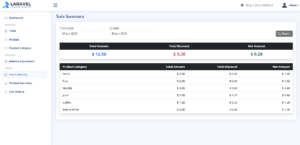
npm run devphp artisan serveWith both commands running in their separate windows, open your web browser to the Laravel address (http://127.0.0.1:8000).
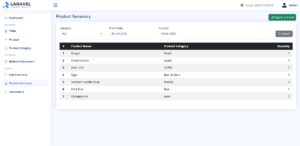
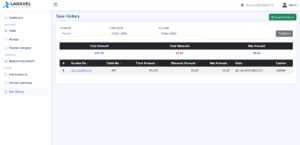
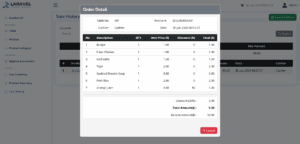
Report & Filter Setup Complete
Great work! 🎉 You’ve just added sales reporting and filtering features to your Laravel POS with jQuery system—allowing users to view transactions by date and export the data to Excel. With Flatpickr and Xlsx-Populate in place, your POS app is now more insightful and business-friendly.
In the final part of this series, we’ll take your reports to the next level by visualizing key metrics using ApexCharts. You’ll learn how to turn raw sales data into beautiful, interactive charts right inside your dashboard.
👉 Continue to Part 8: Create Graph Reports with ApexCharts
Laravel jQuery POS Tutorial for Beginners Series
This step-by-step series will guide you through building a complete Laravel jQuery POS system from scratch:
- Part 1: Install Laravel and Required Packages
Set up Laravel 12.x, jQuery, Bootstrap, and essential dependencies to get your project started. - Part 2: Integrate NiceAdmin Template into Laravel
Design a clean and responsive UI using the NiceAdmin Bootstrap template. - Part 3: Data Migration and Authentication
Implement user login, logout, and role-based access control. - Part 4: Ajax Menu Navigation and System Data (CRUD)
Create smooth navigation and manage key POS data with simple Ajax-based CRUD features. - Part 5: Build the POS Cart System with jQuery
Add products to cart, adjust quantities, and calculate totals with jQuery. - Part 6: Role-Based Access – Admin vs. Cashier
Create middleware to manage access between different user roles. - Part 7: Generate Reports and Filter Sales Data
Show daily sales, filter by date, and export reports using xlsx-populate. - Part 8: Create Graph Reports with ApexCharts
Visualize sales performance using beautiful charts on the dashboard.