Welcome to Part 3 of our Laravel Vue.js POS Tutorial Series! In this tutorial, we’ll handle data migration and implement essential user authentication features. You’ll create the necessary database tables and seed them with dummy data for roles and users. Then, we’ll build core authentication functionality—including login, logout, and changing system user passwords. These steps are crucial for securing your POS system and managing user access effectively.
In this step, you’ll set up a Pinia store to manage user login, logout, and session state within your Laravel Vue.js POS Authentication system. Pinia makes it easy to handle global authentication data securely and reactively across your Vue.js components.
Table of Contents
Step 1: Create Database Tables and Dummy Data for the Whole POS Project
To kick off Laravel Vue.js POS Authentication, use Laravel migrations and seeders to generate essential database tables like users, roles, and POS entities. Then, seed them with dummy data to simulate a working environment for testing authentication features.
Open the Command Prompt (CMD), navigate to your project root directory, and run the following command:
php artisan make:migration project_tablesOverwrite the generated migration file database/migrations/2025_07_02_061238_project_tables.php with this content
<?php

use Illuminate\Database\Migrations\Migration;
use Illuminate\Database\Schema\Blueprint;
use Illuminate\Support\Facades\Schema;

return new class extends Migration
{
    /**
     * Run the migrations.
     */
    public function up(): void
    {
        // update existing user table
        Schema::table('users', function (Blueprint $table) {
            $table->string('username')->unique();
            $table->enum('role', ['admin', 'cashier', 'superadmin']);
            $table->boolean('active');
            $table->bigInteger('created_by_id')->default(0);
            $table->bigInteger('updated_by_id')->default(0);
            $table->bigInteger('deleted_by_id')->default(0);
            $table->dropColumn('name');
            $table->dropColumn('email');
            $table->dropColumn('email_verified_at');
            $table->softDeletes();
        });
        // tables
        Schema::create('tables', function (Blueprint $table) {
            // Set the storage engine to InnoDB
            $table->engine = 'InnoDB';
            $table->id();
            $table->string('name', 50);
            $table->tinyInteger('status')->default(2);
            $table->string('invoice_no', 20)->nullable();
            $table->tinyInteger('discount')->default(0);
            $table->decimal('total_discount')->default(0);
            $table->decimal('grand_total')->default(0);
            $table->decimal('total')->default(0);
            $table->decimal('net_amount')->default(0);
            $table->integer('order')->default(1000);
            $table->bigInteger('created_by_id')->default(0);
            $table->bigInteger('updated_by_id')->default(0);
            $table->bigInteger('deleted_by_id')->default(0);
            $table->timestamps();
            $table->softDeletes();
        });

        // product
        Schema::create('products', function (Blueprint $table) {
            $table->id();
            $table->string('name', 100);
            $table->foreignId('product_category_id');
            $table->decimal('unit_price');
            $table->string('image')->nullable();
            $table->integer('order')->default(1000);
            $table->bigInteger('created_by_id')->default(0);
            $table->bigInteger('updated_by_id')->default(0);
            $table->bigInteger('deleted_by_id')->default(0);
            $table->timestamps();
            $table->softDeletes();
        });

        // product category
        Schema::create('product_categories', function (Blueprint $table) {
            $table->id();
            $table->string('name', 50);
            $table->integer('order')->default(1000);
            $table->bigInteger('created_by_id')->default(0);
            $table->bigInteger('updated_by_id')->default(0);
            $table->bigInteger('deleted_by_id')->default(0);
            $table->timestamps();
            $table->softDeletes();
        });

        // order
        Schema::create('orders', function (Blueprint $table) {
            // Set the storage engine to InnoDB
            $table->engine = 'InnoDB';
            $table->id();
            $table->foreignId('table_id');
            $table->string('invoice_no', 20);
            $table->integer('discount')->default(0);
            $table->decimal('total_discount')->default(0);
            $table->decimal('grand_total')->default(0);
            $table->decimal('total')->default(0);
            $table->decimal('net_amount')->default(0);
            $table->decimal('receive_amount');
            $table->bigInteger('created_by_id')->default(0);
            $table->bigInteger('updated_by_id')->default(0);
            $table->bigInteger('deleted_by_id')->default(0);
            $table->timestamps();
            $table->softDeletes();
        });

        // order detail
        Schema::create('order_details', function (Blueprint $table) {
            // Set the storage engine to InnoDB
            $table->engine = 'InnoDB';
            $table->id();
            $table->foreignId('order_id');
            $table->foreignId('product_id');
            $table->foreignId('product_category_id');
            $table->string('description', 100);
            $table->integer('qty');
            $table->decimal('unit_price');
            $table->tinyInteger('discount')->default(0);
            $table->bigInteger('created_by_id')->default(0);
            $table->bigInteger('updated_by_id')->default(0);
            $table->bigInteger('deleted_by_id')->default(0);
            $table->timestamps();
            $table->softDeletes();
        });

        // order detail temp
        Schema::create('order_detail_temps', function (Blueprint $table) {
            // Set the storage engine to InnoDB
            $table->engine = 'InnoDB';
            $table->id();
            $table->foreignId('table_id');
            $table->foreignId('product_id');
            $table->foreignId('product_category_id');
            $table->string('description', 100);
            $table->integer('qty');
            $table->decimal('unit_price');
            $table->tinyInteger('discount')->default(0);
            $table->bigInteger('created_by_id')->default(0);
            $table->bigInteger('updated_by_id')->default(0);
            $table->timestamps();
        });

        // balance adjustment
        Schema::create('balance_adjustments', function (Blueprint $table) {
            $table->id();
            $table->decimal('amount');
            $table->tinyInteger('type_id');
            $table->date('adjustment_date');
            $table->string('remark');
            $table->bigInteger('created_by_id')->default(0);
            $table->bigInteger('updated_by_id')->default(0);
            $table->bigInteger('deleted_by_id')->default(0);
            $table->timestamps();
            $table->softDeletes();
        });
    }

    /**
     * Reverse the migrations.
     */
    public function down(): void
    {
        Schema::dropIfExists('tables');
        Schema::dropIfExists('products');
        Schema::dropIfExists('product_categories');
        Schema::dropIfExists('orders');
        Schema::dropIfExists('order_details');
        Schema::dropIfExists('order_detail_temps');
        Schema::dropIfExists('balance_adjustments');
    }
};
Overwrite the seeder file database/seeders/DatabaseSeeder.php with this content
<?php

namespace Database\Seeders;

use App\Models\User;
// use Illuminate\Database\Console\Seeds\WithoutModelEvents;
use Illuminate\Database\Seeder;
use Illuminate\Support\Facades\DB;

class DatabaseSeeder extends Seeder
{
    /**
     * Seed the application's database.
     */
    public function run(): void
    {
        // User::factory(10)->create();

        // User::factory()->create([
        //     'name' => 'Test User',
        //     'email' => '[email protected]',
        // ]);

        DB::table('users')->insert([
            'username' => 'superadmin',
            'password' => bcrypt('123456'),
            'role' => 'superadmin',
            'active' => 1,
            'created_at' => date('Y-m-d H:i:s'),
            'updated_at' => date('Y-m-d H:i:s')
        ]);
        DB::table('users')->insert([
            'username' => 'admin',
            'password' => bcrypt('123456'),
            'role' => 'admin',
            'active' => 1,
            'created_at' => date('Y-m-d H:i:s'),
            'updated_at' => date('Y-m-d H:i:s')
        ]);
        DB::table('users')->insert([
            'username' => 'cashier',
            'password' => bcrypt('123456'),
            'role' => 'cashier',
            'active' => 1,
            'created_at' => date('Y-m-d H:i:s'),
            'updated_at' => date('Y-m-d H:i:s')
        ]);

        // insert dummy product category
        $dummyProducts = [
            'Rice' => [
                [
                    'name' => 'Pork Rice',
                    'unit_price' => 2
                ],
                [
                    'name' => 'Chicken Rice',
                    'unit_price' => 2
                ],
                [
                    'name' => 'Fried Rice',
                    'unit_price' => 2
                ]
            ],
            'Noodle' => [
                [
                    'name' => 'Beef Noodle Soup',
                    'unit_price' => 3
                ],
                [
                    'name' => 'Seafood Noodle Soup',
                    'unit_price' => 3
                ]
            ],
            'Snack' => [
                [
                    'name' => 'Fried Chicken',
                    'unit_price' => 1
                ],
                [
                    'name' => 'French Fries',
                    'unit_price' => 1
                ],
                [
                    'name' => 'Burger',
                    'unit_price' => 1
                ]
            ],
            'Water' => [
                [
                    'name' => 'Eau Kulen',
                    'unit_price' => 0.25
                ],
                [
                    'name' => 'Angkor Puro',
                    'unit_price' => 0.25
                ],
                [
                    'name' => 'Dasani',
                    'unit_price' => 0.25
                ]
            ],
            'Coffee' => [
                [
                    'name' => 'Iced Latte',
                    'unit_price' => 1.5
                ],
                [
                    'name' => 'Iced Cappuccino',
                    'unit_price' => 1.5
                ],
                [
                    'name' => 'Iced Americano',
                    'unit_price' => 1.5
                ]
            ],
            'Beer & Wine' => [
                [
                    'name' => 'ABC',
                    'unit_price' => 2
                ],
                [
                    'name' => 'Tiger',
                    'unit_price' => 2
                ],
                [
                    'name' => 'Heineken',
                    'unit_price' => 2
                ]
            ],
            'Juice' => [
                [
                    'name' => 'Orange Juice',
                    'unit_price' => 2
                ],
                [
                    'name' => 'Apple Juice',
                    'unit_price' => 2
                ],
                [
                    'name' => 'Mango Juice',
                    'unit_price' => 2
                ]
            ],
        ];

        foreach ($dummyProducts as $key => $value) {
            $categoryId = DB::table('product_categories')->insertGetId([
                'name' => $key,
                'created_at' => date('Y-m-d H:i:s'),
                'updated_at' => date('Y-m-d H:i:s')
            ]);
            foreach ($value as $product) {
                DB::table('products')->insert([
                    'name' => $product['name'],
                    'unit_price' => $product['unit_price'],
                    'product_category_id' => $categoryId,
                    'created_at' => date('Y-m-d H:i:s'),
                    'updated_at' => date('Y-m-d H:i:s')
                ]);
            }
        }

        // Dummy Table
        for ($i = 1; $i <= 10; $i++) {
            DB::table('tables')->insert([
                'name' => str_pad($i, 3, '0', STR_PAD_LEFT),
                'created_at' => date('Y-m-d H:i:s'),
                'updated_at' => date('Y-m-d H:i:s')
            ]);
        }
    }
}
Then run the migration:
php artisan migrate:fresh --seedNote: After running this command, Laravel will generate all the required project tables along with sample data for products and their categories. Additionally, three default user accounts will be created for testing:
- Username:
superadmin| Password:123456 - Username:
admin| Password:123456 - Username:
cashier| Password:123456
These users can be used to log in and test different access levels within the system.
To learn more about Laravel’s migration system, you can check out the official Laravel migration documentation.
Step 2: Setup Controller for Laravel API
In this step of building Laravel Vue.js POS Authentication, you’ll create backend API controllers to handle user login, logout, password changes, and profile management. These APIs will securely power your frontend authentication system.
Replace the contents of app/Http/Controllers/AuthController.php with the code below. If the file doesn’t exist yet, please create it.
<?php

namespace App\Http\Controllers;

use Exception;
use Illuminate\Http\Request;
use Illuminate\Support\Facades\Auth;
use Illuminate\Support\Facades\Hash;
use Illuminate\Support\Facades\Validator;

class AuthController extends Controller
{
    public function login(Request $request)
    {
        // validation
        $rules = [
            'username' => 'required',
            'password' => 'required'
        ];
        $validator = Validator::make($request->all(), $rules);
        if ($validator->fails())
            return response()->json([
                'success' => false,
                'errors' => $validator->errors()
            ]);

        $credentials = [
            'username' => $request->username,
            'password' => $request->password,
            'active' => 1,
        ];

        if (Auth::attempt($credentials)) {
            return response()->json([
                'success' => true
            ]);
        }
        return response()->json([
            'success' => false,
            'errors' => [
                'username' => ['Incorrect username or password']
            ]
        ]);
    }

    public function user(Request $request)
    {
        $data = $request->user()->only('id', 'username', 'role');
        $data['server_time'] = date('d-M-Y H:i:s');
        return response()->json($data);
    }

    public function logout(Request $request)
    {
        Auth::logout();
        $request->session()->invalidate();
        $request->session()->regenerateToken();
        return response()->json(['success' => true]);
    }

    // Change password
    public function changePassword(Request $request)
    {
        $rules = [
            'old_password' => [
                'required',
                function ($attribute, $value, $fail) use ($request) {
                    if (!Hash::check($value, $request->user()->password)) {
                        $fail('The old password is incorrect');
                    }
                }
            ],
            'new_password' => ['required', 'confirmed'],
        ];
        //validate data
        $validator = Validator::make($request->all(), $rules);
        if ($validator->fails())
            return response()->json([
                'success' => false,
                'errors' => $validator->errors()
            ]);

        // change the password
        try {
            $user = $request->user();
            $user->updated_at = now();
            $user->updated_by_id = $user->id;
            $user->password = bcrypt($request->new_password);
            $user->save();

            $response['success'] = true;
            $response['data'] = null;
        } catch (Exception $ex) {
            abort($ex->getCode(), $ex->getMessage());
        }
        return response()->json($response);
    }
}
Step 3: Create Share Component and Helper Function
Improve reusability and consistency in your Laravel Vue.js POS Authentication frontend by setting up shared Vue components (like input fields or alerts) and helper functions that streamline form handling and validation.
Replace the contents of resources/js/component/share/Modal.vue with the code below. If the file doesn’t exist yet, please create it.
<template>
    <div>
        <div class="modal fade" ref="modal" tabindex="-1" aria-hidden="true" data-bs-keyboard="false"
            data-bs-focus="false" style="z-index: 1055;">
            <div class="modal-dialog">
                <div class="modal-content">
                    <div
                        :class="['modal-header fs-5 py-2', { 'text-bg-success': messageType == 1, 'text-bg-secondary': messageType == 2, 'text-bg-danger': messageType > 2 }]">
                        <i
                            :class="['bi', { 'bi-check-circle': messageType == 1, 'bi-exclamation-circle': messageType == 2, 'bi-x-circle': messageType > 2 }]"></i> {{
                                messageTitle }}
                    </div>
                    <div class="modal-body text-center fs-5">
                        {{ messageText }}
                    </div>
                    <div class="modal-footer justify-content-center">
                        <button type="button" class="btn btn-secondary" data-bs-dismiss="modal">
                            <i class="bi bi-x-lg"></i> NO
                        </button>
                        <button v-if="messageType == 4" class="btn btn-primary px-3" data-bs-dismiss="modal"
                            @click="deleteFunction">
                            <i class="bi bi-check-lg"></i> YES
                        </button>
                    </div>
                </div>
            </div>
        </div>
    </div>
</template>

<script setup>
import { Modal } from 'bootstrap';
import { onMounted, onUnmounted, ref } from 'vue';

const modal = ref(null);
const modalInstance = ref(null);

onMounted(() => {
    if (modal.value) {
        modalInstance.value = new Modal(modal.value);
        modal.value.addEventListener("hide.bs.modal", () => {
            document.activeElement?.blur();
        });
    }
});

onUnmounted(() => {
    if (modal) {
        modalInstance.value.dispose();
    }
});

const messageType = ref(1);
const messageTitle = ref(null);
const messageText = ref(null);
const deleteFunction = ref(null);

/**
 * Show greeting
 * @param type - type of modal (1: Success, 2: Info, 3: Error, 4: Confirm Delete)
 */
const showModal = (type, callback = null, title = null, message = null) => {
    messageType.value = type;
    if (type == 1) {
        messageTitle.value = "SUCCESS";
        messageText.value = "Your data has been saved successfully";
    } else if (type == 2) {
        messageTitle.value = "ALERT";
    }
    else if (type == 3) {
        messageTitle.value = "ERROR";
    }
    else if (type == 4) {
        messageTitle.value = "DELETE";
        messageText.value = "Are you sure want to delete?";
        deleteFunction.value = callback;
    }
    if (title)
        messageTitle.value = title;
    if (message)
        messageText.value = message;
    modalInstance.value?.show();
}

defineExpose({ showModal });

</script>
Replace the contents of resources/js/helper.js with the code below. If the file doesn’t exist yet, please create it.
import dayjs from "dayjs";
import { ref } from "vue";

// Number Format
export function numberFormat(amount, min_point = 2, max_point = 2) {
    const formatter = Intl.NumberFormat('en-US', {
        useGrouping: true,
        minimumFractionDigits: min_point,
        maximumFractionDigits: max_point
    });
    return formatter.format(Number(amount));
}

// Currency Format
export function currencyFormat(amount, min_point = 2, max_point = 2) {
    const formatter = Intl.NumberFormat('en-US', {
        useGrouping: true,
        minimumFractionDigits: min_point,
        maximumFractionDigits: max_point
    });
    return "$" + formatter.format(Number(amount));
}

// Date Format
export function dateFormat(date, excludeTime = false) {
    let format = "DD-MMM-YYYY HH:mm:ss";
    if (excludeTime)
        format = format.split(' ')[0];
    return dayjs(date).format(format);
}

// set focus
export function setFocus(input) {
    const autofocus = input.value;
    if (autofocus) {
        setTimeout(() => {
            autofocus.focus();
            autofocus.select();
        }, 5);
    }
};

// Clear reactive object
export function clearForm(obj) {
    for (const key in obj) {
        obj[key] = null;
    }
}

// date filter config
export const dateFilterConfig = ref({
    wrap: true,
    altFormat: "d-M-Y",
    altInput: true,
    dateFormat: "Y-m-d",
    enableTime: false,
    defaultHour: "00",
    time_24hr: true,
});
Replace the contents of resources/js/component/share/404.vue with the code below. If the file doesn’t exist, create it manually. This view will be used for the fallback route when no other routes match.
<template>
  <div class="d-flex align-items-center justify-content-center vh-100" style="background: whitesmoke">
    <div class="text-center">
      <h1 class="fw-bold" style="font-size: 200px">404</h1>
      <p class="fs-3"><span class="text-danger">Opps!</span> Page not found.</p>
      <p class="lead">The page you’re looking for doesn’t exist.</p>
      <router-link :to="{ path: '/' }" class="btn btn-primary pt-1">Go Home</router-link>
    </div>
  </div>
</template>
<script setup>
import { onMounted } from 'vue';

onMounted(() => {
  document.body.style.display = "block";
});
</script>
Step 4: Setup Vue Component
Create Vue components specifically for your Laravel Vue.js POS Authentication pages, including login forms, password update screens, and dashboard layouts. This modular approach ensures clarity and maintainability.
Replace the contents of resources/js/component/layout/Admin.vue with the code below. If the file doesn’t exist, create it manually.
<template>
    <div>
        <!-- Include Modal Component-->
        <ShareModal ref="messageBox"></ShareModal>
        <!-- Form Modal -->
        <div class="modal fade" ref="formModal" tabindex="-1" aria-hidden="true" data-bs-keyboard="false"
            data-bs-backdrop="static" data-bs-focus="false">
            <div class="modal-dialog">
                <div class="modal-content">
                    <div class="modal-header py-2 bg-secondary text-light">
                        <h5 class="modal-title" style="font-weight: bold">
                            Change Password
                        </h5>
                    </div>
                    <div class="modal-body">
                        <form @submit.prevent="changePassword" id="formPassword">
                            <div class="row">
                                <div class="col-12 mb-3">
                                    <label class="form-label">Name</label>
                                    <input type="text" class="form-control" :value="auth?.user?.username" disabled />
                                </div>
                                <div class="col-12 mb-3">
                                    <label class="form-label required">Old Password</label>
                                    <input type="password" :disabled="isLoading"
                                        :class="['form-control', { 'is-invalid': errors.old_password }]"
                                        v-model="form.old_password" ref="autofocus" />
                                    <span v-if="errors.old_password" class="invalid-feedback"> {{
                                        errors.old_password[0] }}
                                    </span>
                                </div>
                                <div class="col-12 mb-3">
                                    <label class="form-label required">New Password</label>
                                    <input type="password" :disabled="isLoading"
                                        :class="['form-control', { 'is-invalid': errors.new_password }]"
                                        v-model="form.new_password" />
                                    <span v-if="errors.new_password" class="invalid-feedback"> {{
                                        errors.new_password[0] }}
                                    </span>
                                </div>
                                <div class="col-12 mb-3">
                                    <label class="form-label required">New Passwo rd Confirmation</label>
                                    <input type="password" :disabled="isLoading"
                                        :class="['form-control', { 'is-invalid': errors.new_password_confirmation }]"
                                        v-model="form.new_password_confirmation" />
                                    <span v-if="errors.new_password_confirmation" class="invalid-feedback"> {{
                                        errors.new_password_confirmation }}
                                    </span>
                                </div>
                            </div>
                        </form>
                    </div>
                    <div class="modal-footer">
                        <button type="button" class="btn btn-secondary" data-bs-dismiss="modal">
                            <i class="bi bi-x-lg"></i> Cancel
                        </button>
                        <button type="submit" class="btn btn-primary px-3" form="formPassword" :disabled="isLoading">
                            <i v-if="isLoading" class="spinner-border spinner-border-sm" role="status"
                                aria-hidden="true"></i>
                            <i v-else class="bi bi-floppy" style="padding-right: 3px;"></i> Save
                        </button>
                    </div>
                </div>
            </div>
        </div>

        <header id="header" class="header fixed-top d-flex align-items-center">
            <div class="d-flex align-items-center justify-content-between">
                <a href="/" class="logo d-flex align-items-center">
                    <img src="images/logo.png" alt="">
                </a>
                <i class="bi bi-list toggle-sidebar-btn"></i>
            </div>
            <nav class="header-nav ms-auto">
                <ul class="d-flex align-items-center">
                    <li class="d-none d-md-inline-block form-inline ms-auto nav-item dropdown me-5">
                        <i class="bi bi-alarm-fill text-secondary pe-2"></i>
                        <span class="text-secondary">{{ auth?.user?.server_time }}</span>
                    </li>
                    <li class="nav-item dropdown pe-3">
                        <a class="nav-link nav-profile d-flex align-items-center pe-0" href="#"
                            data-bs-toggle="dropdown">
                            <i class="bi bi-person-fill" style="font-size: 35px;"></i>
                            <span class="d-none d-md-block dropdown-toggle ps-2 text-capitalize">{{ auth?.user?.username
                                }}</span>
                        </a>
                        <ul class="dropdown-menu dropdown-menu-end dropdown-menu-arrow profile">
                            <li>
                                <button class="dropdown-item d-flex align-items-center" @click="openModal">
                                    <i class="bi bi-shield-lock"></i>
                                    <span>Change Password</span>
                                </button>
                            </li>
                            <li>
                                <hr class="dropdown-divider">
                            </li>
                            <li>
                                <button type="submit" class="dropdown-item d-flex align-items-center"
                                    @click="auth.logout()">
                                    <i class="bi bi-box-arrow-right"></i>
                                    <span>Sign Out</span>
                                </button>
                            </li>
                        </ul>
                    </li>
                </ul>
            </nav>

        </header>

        <!-- ======= Sidebar ======= -->
        <aside id="sidebar" class="sidebar">
            <ul class="sidebar-nav" id="sidebar-nav">
                <li class="nav-item">
                    <router-link :to="{ path: '/' }" :class="['nav-link', { collapsed: $route.path != '/' }]">
                        <i class="bi bi-speedometer2"></i>
                        <span>Dashboard</span>
                    </router-link>
                </li>
                <li class="nav-heading">Main Data</li>
                <li class="nav-item">
                    <router-link :to="{ path: 'table' }" :class="['nav-link', { collapsed: $route.path != 'table' }]">
                        <i class="bi bi-grid-3x3-gap"></i>
                        <span>Table</span>
                    </router-link>
                </li>
                <li class="nav-item">
                    <router-link :to="{ path: 'product' }"
                        :class="['nav-link', { collapsed: $route.path != 'product' }]">
                        <i class="bi bi-list-ul"></i>
                        <span>Product</span>
                    </router-link>
                </li>
                <li class="nav-item">
                    <router-link :to="{ path: 'product-category' }"
                        :class="['nav-link', { collapsed: $route.path != 'product-category' }]">
                        <i class="bi bi-grid"></i>
                        <span>Product Category</span>
                    </router-link>
                </li>
                <li class="nav-heading">Operation</li>
                <li class="nav-item">
                    <router-link :to="{ path: 'balance-adjustment' }"
                        :class="['nav-link', { collapsed: $route.path != 'balance-adjustment' }]">
                        <i class="bi bi-coin"></i>
                        <span>Balance Adjustment</span>
                    </router-link>
                </li>
                <li class="nav-heading">Report</li>
                <li class="nav-item">
                    <router-link :to="{ path: 'sale-summary' }"
                        :class="['nav-link', { collapsed: $route.path != 'sale-summary' }]">
                        <i class="bi bi-graph-up-arrow"></i>
                        <span>Sale Summary</span>
                    </router-link>
                </li>
                <li class="nav-item">
                    <router-link :to="{ path: 'product-summary' }"
                        :class="['nav-link', { collapsed: $route.path != 'product-summary' }]">
                        <i class="bi bi-clipboard-data"></i>
                        <span>Product Summary</span>
                    </router-link>
                </li>
                <li class="nav-item">
                    <router-link :to="{ path: 'sale-history' }"
                        :class="['nav-link', { collapsed: $route.path != 'sale-history' }]">
                        <i class="bi bi-clock-history"></i>
                        <span>Sale History</span>
                    </router-link>
                </li>
                <li class="nav-heading" v-if="auth.user?.role == 'superadmin'">System Setting</li>
                <li class="nav-item" v-if="auth.user?.role == 'superadmin'">
                    <router-link :to="{ path: 'user' }" :class="['nav-link', { collapsed: $route.path != 'user' }]">
                        <i class="bi bi-people"></i>
                        <span>System User</span>
                    </router-link>
                </li>
            </ul>
        </aside>

        <main id="main" class="main">
            <router-view></router-view>
        </main>
    </div>
</template>
<script setup>
import { onMounted, onUnmounted, ref } from 'vue';
import { Modal } from 'bootstrap';
import { useAuthStore } from '@/store/auth';
import ShareModal from '../Share/Modal.vue';
import { clearForm, setFocus } from '../../helper.js';

const formModalInstance = ref(null);
const formModal = ref(null);
const autofocus = ref(null);
const messageBox = ref(null);
const isLoading = ref(false);
const auth = useAuthStore();

const form = ref(
    {
        old_password: null,
        new_password: null,
        new_password_confirmation: null
    }
);
const errors = ref({});

onMounted(() => {
    import("../../main.js");
    document.body.style.display = "block";

    if (formModal.value) {
        formModalInstance.value = new Modal(formModal.value);
        formModal.value.addEventListener("shown.bs.modal", () => {
            setFocus(autofocus);
        });
        formModal.value.addEventListener("hide.bs.modal", () => {
            document.activeElement?.blur();
        });
        formModal.value.addEventListener("hidden.bs.modal", () => {
            clearForm(form.value);
            errors.value = {};
        });
    }
});
onUnmounted(() => {
    if (formModalInstance.value) {
        formModalInstance.value.dispose();
    }
});

// add or create
const openModal = () => {
    formModalInstance.value.show();
};

// submit form
const changePassword = () => {
    isLoading.value = true;
    axios.post("api/auth/change-password", form.value)
        .then((response) => {
            if (response.data.success) {
                formModalInstance.value.hide();
                messageBox.value.showModal(1, null, null, 'Your password has been changed successfully');
            } else {
                errors.value = response.data.errors;
                setFocus(autofocus);
            }
        })
        .catch((ex) => {
            console.log(ex);
            setFocus(autofocus);
        })
        .finally(() => {
            isLoading.value = false;
        });
};
</script>
Step 5: Create Pinia Store for Login and User Session Management
Manage global authentication state in your Laravel Vue.js POS Authentication system using Pinia. This includes storing the user token, login status, and profile data for secure and reactive state handling.
Replace the contents of resources/js/store/auth.js with the code below. If the file doesn’t exist, create it manually.
import { defineStore } from 'pinia'
import router from '../router'

export const useAuthStore = defineStore('auth', {
    state: () => ({
        user: null,
    }),

    actions: {
        async getUser() {
            try {
                const response = await axios.get('/api/auth/user')
                this.user = response.data
            } catch {
                this.user = null
            }
        },
        logout() {
            axios.post('/api/logout').then(() => { this.user = null; router.push('/login'); });
        }
    }
})
Step 6: Setup Vue Router
Configure Vue Router to handle navigation in your Laravel Vue.js POS Authentication system. Define routes for login, dashboard, and error pages while implementing navigation guards to protect authenticated views.
Replace the contents of resources/js/router/index.js with the code below. If the file doesn’t exist, create it manually.
import { createRouter, createWebHistory } from 'vue-router';
import { useAuthStore } from '@/store/auth';

const routes = [
    {
        name: "login",
        path: "/login",
        component: () => import("@/component/share/Login.vue"),
    },
    {
        path: "/",
        component: () => import("@/component/layout/Admin.vue"),
        meta: {
            requiresAuth: true
        },
        children: [
            // ========= Dashboard =========
            {
                path: "/",
                component: () => import("@/component/dashboard/Dashboard.vue"),
            },
        ],
    },
    {
        path: "/:pathMatch(.*)*",
        component: () => import("@/component/share/404.vue"),
    }
]

const router = createRouter({
    history: createWebHistory(),
    routes,
})
router.beforeEach(async (to, from, next) => {
    const auth = useAuthStore()
    if (auth.user === null) {
        await auth.getUser();
    }
    if (to.meta.requiresAuth && !auth.user) {
        next('/login')
    } else {
        next()
    }
})
export default router
Step 7: Setup Route for Backend
Register the necessary API routes in routes/api.php to support Laravel Vue.js POS Authentication. These routes will handle user login, logout, and password updates, all protected with authentication middleware.
Replace the contents of routes/web.php with the code below
<?php

use Illuminate\Support\Facades\Route;

Route::get('{any}', function () {
    return view('welcome');
})->where('any', '.*');
Replace the contents of routes/api.php with the code below
<?php

use App\Http\Controllers\AuthController;
use Illuminate\Support\Facades\Route;

Route::post('/login', [AuthController::class, 'login']);
Route::post('/logout', [AuthController::class, 'logout']);

Route::middleware('auth:sanctum')->group(function () {
    // Auth
    Route::prefix('auth')->controller(AuthController::class)->group(function () {
        Route::get('/user',  'user');
        Route::post('/change-password', [AuthController::class, 'changePassword']);
    });
});
Running and Testing Your Project
Open your Terminal/CMD in separate windows, go to the project’s root folder, and then run the command below:
npm run devphp artisan serveWith both commands running in their separate windows, open your web browser to the Laravel address (http://127.0.0.1:8000).
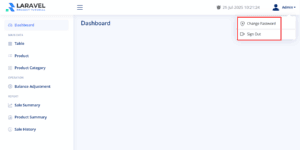
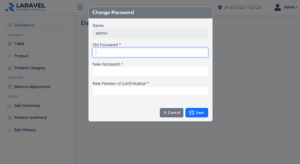
You should now see your Laravel Vue.js POS project running with the database tables, sample data, and a basic login system ready for upcoming features.
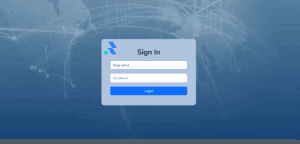
Please use this default account to log in
- Username:
superadmin| Password:123456 - Username:
admin| Password:123456 - Username:
cashier| Password:123456
Setup Complete
Well done! 🎉 You’ve now completed the foundational setup of your Laravel Vue.js POS project. In this part, you created essential database tables, added sample data, and implemented a basic authentication system—giving your POS app real structure and secure access control.
In the next tutorial, we’ll move on to building CRUD functionality for managing products, categories, tables, users, and balance adjustment. You’ll learn how to create, edit, and delete records using Laravel’s powerful tools—bringing your POS system to life.
👉 Continue to Part 4: Navigation & CRUD Operations
Laravel Vue.js POS Tutorial for Beginners Series
This step-by-step series will guide you through building a complete Laravel Vue.js POS system from scratch:
- Part 1: Install Laravel Framework
Set up a fresh Laravel 12 project and configure the environment and database for your POS backend. - Part 2: Create Vue SPA & Integrate NiceAdmin
Convert Laravel into a Vue.js SPA with Vue Router, install Vue 3, Bootstrap 5, and integrate the NiceAdmin template for a modern UI. - Part 3: Data Migration & Authentication
Migrate tables for users, roles, and products. Add authentication using Laravel Sanctum. - Part 4: Navigation & CRUD Operations
Build dynamic sidebar navigation and implement CRUD for products, categories, and users using API and Vue components. - Part 5: POS Cart System
Create a POS cart where users can add, update, and remove items using Vue 3’s built-in reactivity. - Part 6: Reports & Sales Filters
Add sales report filtering by date, user, or payment. Enable Excel export and receipt printing. - Part 7: Dashboard with ApexCharts
Display real-time sales data in responsive charts using ApexCharts.