Protecting your login form from bots and brute-force attacks is essential for any modern web application. In this guide, we’ll show you how to implement a Laravel Vue.js Google reCAPTCHA login system that combines the power of reCAPTCHA v3 and Invisible reCAPTCHA v2 for advanced security and seamless user experience.
You’ll learn how to integrate reCAPTCHA verification into both your Laravel backend and Vue.js frontend, ensuring that only legitimate users can log in — without slowing down your app.
This tutorial also builds upon the foundation from our previous guide, Laravel 12 Vue 3 Session Based Authentication – Complete SPA Tutorial for Beginners, extending it with robust bot-protection techniques.
Table of Contents
Step 1: Check Out the Previous Tutorial First
Before starting this guide, make sure you’ve already completed the setup from the previous post: Laravel 12 Vue 3 Session Based Authentication – Complete SPA Tutorial for Beginners.
👉 This tutorial builds on top of that project structure, so having it ready will help you continue smoothly.
You can read it here: https://laravelcenter.com/laravel-12-vue-3-session-based-authentication/
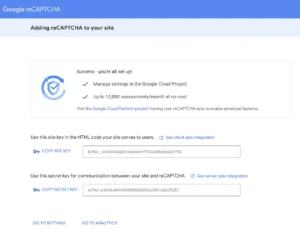
Step 2: Get Google reCAPTCHA Site & Secret Keys
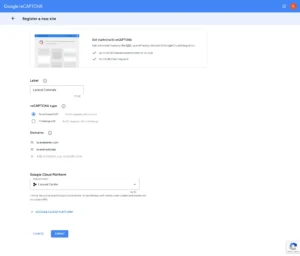
To begin setting up your Laravel Vue.js Google reCAPTCHA login, head to the Google reCAPTCHA Admin Console.
Register your domain and generate both the Site Key and Secret Key.
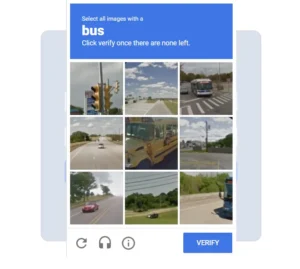
Enable reCAPTCHA v3 as your primary defense and Invisible reCAPTCHA v2 as a backup challenge.
- Go to Google reCAPTCHA Admin Console
- Register a new site:
- Label: e.g., “Laravel Vue Auth”
- reCAPTCHA Type: reCAPTCHA v3
- Domains: your domain or
localhostfor testing
- Click Submit and copy:
- Site Key – used on the frontend (Vue.js)
- Secret Key – used on the backend (Laravel)
Step 3: Store Keys in Laravel Environment
Once you’ve got your keys, store them securely in your Laravel .env file.
This ensures that your credentials remain private and can be easily managed across different environments (local, staging, or production).
You’ll later use these keys in your backend verification logic for the Laravel Vue.js Google reCAPTCHA login system.
Edit your Laravel .env file:
GOOGLE_RECAPTCHA_V3_SITE_KEY=your-v3-site-key
GOOGLE_RECAPTCHA_V3_SECRET_KEY=your-v3-secret-key

GOOGLE_RECAPTCHA_V2_SITE_KEY=your-v2-invisible-site-key
GOOGLE_RECAPTCHA_V2_SECRET_KEY=your-v2-invisible-secret-key
Step 4: Update Login Controller for reCAPTCHA Verification
In this step, you’ll modify your Laravel login controller to verify both reCAPTCHA v3 scores and handle the fallback Invisible reCAPTCHA v2 challenge.
The controller will make a request to Google’s API, interpret the score, and decide whether to proceed, reject, or prompt the user for additional verification.
This step forms the core security logic of your Laravel Vue.js Google reCAPTCHA login.
In your Laravel API login controller AuthController.php, modify the login method:
use Illuminate\Support\Facades\Http;

// Laravel Vue.js Google reCAPTCHA login
public function login(Request $request)
{
    $rules = [
        'email' => 'required|email',
        'password' => 'required',
        'recaptcha_token' => 'required', // token from both v2 and v3
    ];

    // form validation
    $validator = Validator::make($request->all(), $rules);
    if ($validator->fails())
        return response()->json([
            'success' => false,
            'errors' => $validator->errors()
        ]);

    if ($request->recaptcha == 'V3') {
        // Verify reCAPTCHA v3
        $response = Http::asForm()->post('https://www.google.com/recaptcha/api/siteverify', [
            'secret' => env("GOOGLE_RECAPTCHA_V3_SECRET_KEY"),
            'response' => $request->recaptcha_token,
        ])->json();
    } else {
        // Verify reCAPTCHA v2
        $response = Http::asForm()->post('https://www.google.com/recaptcha/api/siteverify', [
            'secret' => env("GOOGLE_RECAPTCHA_V2_SECRET_KEY"),
            'response' => $request->recaptcha_token,
        ])->json();
    }

    $score = $response['score'] ?? 0;
    $success = $response['success'] ?? false;

    if (!$success) {
        return response()->json([
            'success' => false,
            'errors' => [
                'email' => ['reCAPTCHA verification failed.']
            ]
        ]);
    } elseif ($score <= 0.3 && $request->recaptcha == 'V3') {
        // 🚫 Definitely bot
        return response()->json(
            [
                'success' => false,
                'errors' => [
                    'email' => ['Suspicious activity detected. Please try again later.']
                ]
            ]
        );
    } elseif ($score <= 0.7 && $request->recaptcha == 'V3') {
        // ⚠️ Suspicious – require invisible reCAPTCHA v2
        return response()->json([
            'success' => false,
            'require_v2' => true,
        ]);
    } else {
        $user = User::where('email', $request->email)->first();
        if (!$user || !Hash::check($request->password, $user->password)) {
            return response()->json(
                [
                    'success' => false,
                    'errors' => [
                        'email' => ['Incorrect email or password']
                    ]
                ]
            );
        }

        Auth::login($user);

        return response()->json([
            'success' => true,
            'user' => $user->only('id', 'name', 'email'),
        ]);
    }
}
Step 5: Update Your Vue.js Login Form
On the frontend, you’ll integrate Google’s reCAPTCHA scripts directly into your Vue.js login component to build a complete Laravel Vue.js Google reCAPTCHA login experience.
The form will automatically generate a reCAPTCHA v3 token when the user attempts to log in, and if the score appears suspicious, it will seamlessly trigger the Invisible reCAPTCHA v2 challenge.
This approach keeps your Laravel Vue.js Google reCAPTCHA login fast, secure, and user-friendly — allowing genuine users to sign in instantly while preventing automated bots from accessing your system.
In your Login.vue component:
<template>
    <section class="vh-100">
        <div class="container py-5 h-100">
            <div class="row d-flex justify-content-center align-items-center h-100">
                <div class="col-12 col-md-8 col-lg-6 col-xl-5">
                    <div class="card shadow-2-strong" style="border-radius: 1rem; background: lightsteelblue;">
                        <div class="card-body p-5">
                            <h1 class="mb-4 text-center fw-bold">Sign In</h1>
                            <form @submit.prevent="login">
                                <div class="form-outline mb-4">
                                    <input type="text"
                                        :class="['form-control form-control-lg', { 'is-invalid': errors?.email }]"
                                        placeholder="Email" ref="autofocus" v-model="form.email"
                                        :disabled="processing" />
                                    <span v-if="errors?.email" class="text-danger form-label" style="padding-left: 5px">
                                        {{ errors?.email[0] }}
                                    </span>
                                </div>
                                <div class="form-outline mb-4">
                                    <input type="password"
                                        :class="['form-control form-control-lg', { 'is-invalid': errors?.password }]"
                                        placeholder="Password" v-model="form.password" :disabled="processing" />
                                    <span v-if="errors?.password" class="text-danger form-label"
                                        style="padding-left: 5px">
                                        {{ errors?.password[0] }}
                                    </span>
                                </div>
                                <div class="d-grid mb-2">
                                    <button class="btn btn-primary btn-lg" type="submit" :disabled="processing">
                                        <span v-show="processing" class="spinner-border spinner-border-sm" role="status"
                                            aria-hidden="true"></span>
                                        Login
                                    </button>
                                </div>
                            </form>
                            <div class="py-3 text-center fs-5">
                                Don't have an account? <RouterLink :to="{ path: '/register' }">Register</RouterLink>
                            </div>
                        </div>
                    </div>
                </div>
            </div>
        </div>
    </section>
    <div id="recaptcha-fallback-container" style="display: none;"></div>
</template>

<script setup>
import { onMounted, ref } from "vue";
import { RouterLink, useRouter } from "vue-router";
import { useAuthStore } from "@/stores/auth";

const processing = ref(false);
const form = ref({
    email: null,
    password: null,
    recaptcha: null,
    recaptcha_token: null
});
const errors = ref(null);
const router = useRouter();
const autofocus = ref(null);
const siteKeyV3 = ref(import.meta.env.VITE_GOOGLE_RECAPTCHA_V3_SITE_KEY)
const siteKeyV2 = ref(import.meta.env.VITE_GOOGLE_RECAPTCHA_V2_SITE_KEY)
const auth = useAuthStore();

const login = async () => {
    processing.value = true;

    // Run reCAPTCHA v3
    const token = await grecaptcha.execute(siteKeyV3.value, { action: 'login' })
    form.value.recaptcha_token = token;
    form.value.recaptcha = 'V3';

    // Send to backend for evaluation
    let response = await auth.login(form.value);

    if (response.data.success) {
        router.push('/');
    }
    else if (response.data.require_v2) {
        await runRecaptchaV2Fallback()
    }
    else {
        errors.value = response.data.errors;
        // set autofocus
        setTimeout(() => {
            autofocus.value.focus();
            autofocus.value.select();
        }, 5);
    }
    processing.value = false;
};

const runRecaptchaV2Fallback = async () => {
    // 1. Wait for grecaptcha library to be fully ready
    await new Promise((resolve) => grecaptcha.ready(resolve));

    // 2. Explicitly RENDER the invisible widget
    // The render() function returns the widget ID (rcapt_id)
    const rcapt_id = grecaptcha.render('recaptcha-fallback-container', {
        'sitekey': siteKeyV2.value,
        'size': 'invisible', // Makes it invisible
        // NOTE: No 'action' parameter here. Actions are V3-specific.
    });

    // 3. Execute the rendered widget
    const token = await grecaptcha.execute(rcapt_id);

    // 4. Clean up the widget after execution (optional but good practice)
    grecaptcha.reset(rcapt_id);

    form.value.recaptcha_token = token;
    form.value.recaptcha = 'V2';

    // Send to backend for evaluation
    let response = await auth.login(form.value);

    if (response.data.success) {
        router.push('/');
    }
    else {
        errors.value = response.data.errors;
        // set autofocus
        setTimeout(() => {
            autofocus.value.focus();
            autofocus.value.select();
        }, 5);
    }
};

onMounted(() => {
    autofocus.value.focus();

    // Return a promise that resolves when the script is loaded
    return new Promise((resolve, reject) => {
        if (window.grecaptcha) {
            return resolve(); // Already loaded
        }

        // load reCAPTCHA V3 script
        const script = document.createElement('script');
        script.src = `https://www.google.com/recaptcha/api.js?render=${siteKeyV3.value}`;
        script.async = true;
        script.onload = () => resolve();
        script.onerror = () => reject(new Error('reCAPTCHA script failed to load.'));
        document.head.appendChild(script);

        // load reCAPTCHA V2 script
        script.src = `https://www.google.com/recaptcha/api.js?render=${siteKeyV2.value}`;
        script.async = true;
        script.onload = () => resolve();
        script.onerror = () => reject(new Error('reCAPTCHA script failed to load.'));
        document.head.appendChild(script);
    });
});

</script>
Final Step: Running and Testing Your Project
To test your project, run the Laravel server:
php artisan serveIf your project also uses Vue.js, run the frontend in a separate terminal:
npm run devAfter both are running, open your browser and visit:
http://127.0.0.1:8000Make sure all pages load and your features work as expected.
- Open your Vue app in the browser
- Enter valid credentials
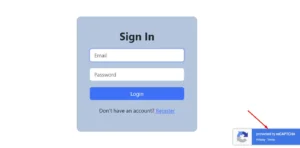
- Submit the form — you’ll see reCAPTCHA silently verifying in the background
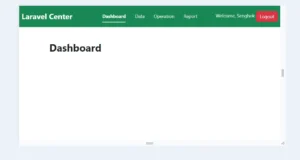
- If successful, you’ll receive the authentication token
Conclusion
By following these steps, you’ve built a powerful Laravel Vue.js Google reCAPTCHA login system that combines reCAPTCHA v3’s invisible scoring with the Invisible reCAPTCHA v2 fallback challenge for suspicious activity.
This dual-layer setup helps protect your application from automated bots, brute-force attacks, and spam logins — without sacrificing the smooth user experience that Vue.js provides.
If you’ve followed our earlier post, Laravel 12 Vue 3 Session Based Authentication – Complete SPA Tutorial for Beginners, this upgrade completes your authentication system with enterprise-grade bot protection.
Your app is now more secure, more reliable, and ready for real-world users.