In this guide, you’ll learn how to implement Laravel 12 Vue 3 session based authentication step by step using Laravel Sanctum. We’ll build a complete Single Page Application (SPA) that supports secure user registration, login, logout, and route protection — all handled through HTTP-only session between Laravel 12 and Vue 3.
To make the interface look clean and modern, we’ll use Bootstrap for styling, create a simple navigation menu, and highlight the active page when switching routes — helping you clearly understand how SPA navigation works.
You’ll also learn how to create a fallback route to handle pages that are not found (404) and redirect users back to the correct route.
By the end of this tutorial, you’ll have a fully functional Laravel 12 Vue 3 session based authentication system with a responsive Bootstrap UI, dynamic routing, and secure session-based communication between the backend and frontend.
What You’ll Build
You’ll create:
✅ A Laravel 12 API backend secured with Sanctum session
✅ A Vue 3 SPA frontend using Vue Router and Pinia
✅ A secure session-based authentication system using Sanctum sessions
✅ A Bootstrap-based UI with a responsive navigation menu
By the end, you’ll be able to:
- Register new users and log in using session
- Access protected API routes securely
- Stay authenticated using Sanctum’s session-based session
- Log out and clear authentication session safely
- Navigate between pages with highlighted active menus
This guide is perfect for beginners who want a clear, step-by-step approach to implementing session based authentication in Laravel 12 and Vue 3 SPA.
Table of Contents
Step 1 : Create Laravel 12 Project and Configure Database
Start building your Laravel 12 Vue 3 Session Based Authentication project by creating a fresh Laravel 12 setup. Configure the .env file with your database credentials to store users securely for authentication.
Run the following command in your terminal:
composer global require laravel/installer(You only need to run this once globally).
laravel new laravel-vue-session-authEdit your .env file:
DB_CONNECTION=mysql
DB_HOST=127.0.0.1
DB_PORT=3306
DB_DATABASE=laravel_vue_session_auth
DB_USERNAME=root
DB_PASSWORD=
Then run the migrations:
php artisan migrateStep 2 : Install and Configure Laravel Sanctum for Session Authentication
Install Laravel Sanctum and configure it to handle session based authentication for your Laravel 12 Vue 3 SPA. Update CORS and session middleware to allow secure session communication between the frontend and backend.
Install it via Artisan command:
php artisan install:apiOpen bootstrap/app.php and add statefulApi middleware:
->withMiddleware(function (Middleware $middleware): void {
    $middleware->statefulApi();
})
Open resources/js/bootstrap.js and add this:
axios.defaults.withCredentials = true;
axios.defaults.withXSRFToken = true;
Step 3 : Build Authentication Controller and Routes
Create an AuthController to handle user registration, login, logout, and fetch the authenticated user. Then, define the API routes in api.php and web.php for session-based authentication.
Run the following command in your terminal:
php artisan make:controller Api/AuthControllerThen edit app/Http/Controllers/Api/AuthController.php:
<?php
// Laravel 12 Vue 3 Session Based Authentication - http://laravelcenter.com
namespace App\Http\Controllers\Api;

use App\Http\Controllers\Controller;
use App\Models\User;
use Illuminate\Http\Request;
use Illuminate\Support\Facades\Auth;
use Illuminate\Support\Facades\Hash;
use Illuminate\Support\Facades\Validator;

class AuthController extends Controller
{
    // Register
    public function register(Request $request)
    {
        $rules = [
            'name' => 'required|string|max:255',
            'email' => 'required|email|unique:users',
            'password' => 'required|confirmed',
        ];

        $validator = Validator::make($request->all(), $rules);
        if ($validator->fails())
            return response()->json([
                'success' => false,
                'errors' => $validator->errors()
            ]);

        User::create([
            'name' => $request->name,
            'email' => $request->email,
            'password' => Hash::make($request->password),
        ]);

        return response()->json(['success' => true]);
    }

    // Login
    public function login(Request $request)
    {
        $rules = [
            'email' => 'required|email',
            'password' => 'required',
        ];

        $validator = Validator::make($request->all(), $rules);
        if ($validator->fails())
            return response()->json([
                'success' => false,
                'errors' => $validator->errors()
            ]);

        $user = User::where('email', $request->email)->first();

        if (!$user || !Hash::check($request->password, $user->password)) {
            return response()->json(
                [
                    'success' => false,
                    'errors' => [
                        'email' => ['Incorrect email or password']
                    ]
                ]
            );
        }

        Auth::login($user);

        return response()->json([
            'success' => true,
            'user' => $user->only('id', 'name', 'email'),
        ]);
    }

    // Get Authenticated User
    public function user(Request $request)
    {
        return response()->json($request->user()->only('id', 'name', 'email'));
    }

    // Logout
    public function logout(Request $request)
    {
        Auth::guard('web')->logout();
        // Invalidate session and regenerate CSRF token
        $request->session()->invalidate();
        $request->session()->regenerateToken();

        return response()->json(['message' => 'Logged out successfully']);
    }
}
Open routes/web.php and add:
<?php
// Laravel 12 Vue 3 Session Based Authentication - http://laravelcenter.com
use Illuminate\Support\Facades\Route;

Route::get('{any}', function () {
    return view('welcome');
})->where('any', '.*');
Open routes/api.php and add:
<?php
// Laravel 12 Vue 3 Session Based Authentication - http://laravelcenter.com
use Illuminate\Support\Facades\Route;
use App\Http\Controllers\Api\AuthController;

Route::post('/register', [AuthController::class, 'register']);
Route::post('/login', [AuthController::class, 'login']);

Route::middleware('auth:sanctum')->group(function () {
    Route::get('/user', [AuthController::class, 'user']);
    Route::post('/logout', [AuthController::class, 'logout']);
});
Step 4 : Setup Vue 3 SPA and Configure vite.config.js
Initialize your Vue 3 Single Page Application (SPA) and configure vite.config.js to connect with Laravel 12. This step ensures smooth integration for your Laravel 12 Vue 3 Session Based Authentication system.
Install the necessary packages:
npm install --save-dev @vitejs/plugin-vuenpm install vue@3 vue-router@4 pinia axios bootstrap vue-loading-overlay @vuelidate/core @vuelidate/validators sweetalert2 dayjsUpdate content of vite.config.js file like below
import { defineConfig } from 'vite';
import laravel from 'laravel-vite-plugin';
// import tailwindcss from '@tailwindcss/vite';
import vue from '@vitejs/plugin-vue';

export default defineConfig({
    plugins: [
        laravel({
            input: ['resources/js/app.js'],
            refresh: true,
        }),
        // tailwindcss(),
        vue({
            template: {
                transformAssetUrls: {
                    base: null,
                    includeAbsolute: false,
                },
            },
        }),
    ],
});
Open resources/js/app.js:
import './bootstrap';
import 'bootstrap/dist/css/bootstrap.min.css';
import { createApp } from 'vue'
import { createPinia } from 'pinia'
import router from './router'
import App from './App.vue'

createApp(App)
    .use(createPinia())
    .use(router)
    .mount('#app')
Step 5 : Setup Vue Router for SPA Navigation
Configure Vue Router to handle routes such as Login, Register, and Dashboard for your Laravel 12 Vue 3 Session Based Authentication app. You’ll also add a fallback route to handle 404 pages gracefully.
Create resources/js/router/index.js:
import { createRouter, createWebHistory } from 'vue-router'
import { useAuthStore } from '@/stores/auth'

const routes = [
    {
        path: "/login",
        component: () => import("@/pages/Login.vue"),
    },
    {
        path: "/register",
        component: () => import("@/pages/Register.vue"),
    },
    {
        path: "/",
        component: () => import("@/pages/Layout.vue"),
        meta: {
            requiresAuth: true,
        },
        children: [
            {
                path: "/",
                component: () => import("@/pages/Dashboard.vue"),
            },
            {
                path: "/data",
                component: () => import("@/pages/Data.vue")
            },
            {
                path: "/operation",
                component: () => import("@/pages/Operation.vue")
            },
            {
                path: "/report",
                component: () => import("@/pages/Report.vue")
            }
        ],
    },
    {
        path: "/:pathMatch(.*)*",
        component: () => import("@/pages/404.vue"),
    }
]

const router = createRouter({
    history: createWebHistory(),
    routes,
})

router.beforeEach(async (to, from, next) => {
    const auth = useAuthStore()
    if (!auth.user) {
        await auth.getUser();
    }

    if (to.meta.requiresAuth && !auth.user) {
        next('/login')
    } else if (auth.user && ['/login', '/register'].includes(to.path)) {
        next('/');
    }
    else {
        next()
    }
})

export default router
Step 6 : Create Pinia Store (auth.js) for Managing Authentication State
Use Pinia to manage user state, authentication sessions, and API communication. This helps maintain a smooth session based authentication flow across your Laravel 12 and Vue 3 SPA.
Create resources/js/stores/auth.js:
import { defineStore } from 'pinia'
import axios from 'axios'
import router from '@/router'

export const useAuthStore = defineStore('auth', {
    state: () => ({
        user: null,
    }),

    actions: {
        async register(form) {
            return await axios.post('/api/register', form);
        },

        async login(form) {
            await axios.get('/sanctum/csrf-cookie');
            const response = await axios.post('/api/login', form)
            if (response.data.success) {
                this.user = response.data.user
            }
            return response;
        },

        async getUser() {
            try {
                const response = await axios.get('/api/user')
                this.user = response.data
                console.log(response.data);
            } catch {
                this.user = null
            }
        },

        async logout() {
            await axios.post('/api/logout')
            this.user = null
            router.push('/login')
        },
    },
})
Step 7 : Create Vue Components
Build the Vue 3 components such as Login, Register, Dashboard, and Navbar. Use Bootstrap to design a responsive and modern UI for your Laravel 12 Vue 3 Session Based Authentication tutorial.
Create resources/js/App.vue
<template>
    <router-view />
</template>
Create resources/js/pages/Register.vue
<template>
    <section class="vh-100">
        <div class="container py-5 h-100">
            <div class="row d-flex justify-content-center align-items-center h-100">
                <div class="col-12 col-md-8 col-lg-6 col-xl-5">
                    <div class="card shadow-2-strong" style="border-radius: 1rem; background: lightsteelblue;">
                        <div class="card-body p-5">
                            <h1 class="mb-4 text-center fw-bold">Register</h1>
                            <form @submit.prevent="register">
                                <div class="form-outline mb-4">
                                    <input type="text"
                                        :class="['form-control form-control-lg', { 'is-invalid': errors?.name }]"
                                        placeholder="Name" ref="autofocus" v-model="form.name" :disabled="processing" />
                                    <span v-if="errors?.name" class="text-danger form-label" style="padding-left: 5px">
                                        {{ errors?.name[0] }}
                                    </span>
                                </div>
                                <div class="form-outline mb-4">
                                    <input type="text"
                                        :class="['form-control form-control-lg', { 'is-invalid': errors?.email }]"
                                        placeholder="Email" v-model="form.email" :disabled="processing" />
                                    <span v-if="errors?.email" class="text-danger form-label" style="padding-left: 5px">
                                        {{ errors?.email[0] }}
                                    </span>
                                </div>
                                <div class="form-outline mb-4">
                                    <input type="password"
                                        :class="['form-control form-control-lg', { 'is-invalid': errors?.password }]"
                                        placeholder="Password" v-model="form.password" :disabled="processing" />
                                    <span v-if="errors?.password" class="text-danger form-label"
                                        style="padding-left: 5px">
                                        {{ errors?.password[0] }}
                                    </span>
                                </div>
                                <div class="form-outline mb-4">
                                    <input type="password" class="form-control form-control-lg"
                                        placeholder="Confirm Password" v-model="form.password_confirmation"
                                        :disabled="processing" />
                                </div>
                                <div class="d-grid mb-2">
                                    <button class="btn btn-primary btn-lg" type="submit" :disabled="processing">
                                        <span v-show="processing" class="spinner-border spinner-border-sm" role="status"
                                            aria-hidden="true"></span>
                                        Register
                                    </button>
                                </div>
                            </form>
                            <div class="py-3 text-center fs-5">
                                Already have an account? <RouterLink :to="{ path: '/login' }">Login</RouterLink>
                            </div>
                        </div>
                    </div>
                </div>
            </div>
        </div>
    </section>
</template>

<script setup>
import { onMounted, ref } from "vue";
import { RouterLink, useRouter } from "vue-router";
import { useAuthStore } from "@/stores/auth";

const processing = ref(false);
const form = ref({
    name: null,
    email: null,
    password: null,
    password_confirmation: null

});

const errors = ref(null);
const router = useRouter();
const autofocus = ref(null);
const register = async () => {
    processing.value = true;
    const auth = useAuthStore();
    const response = await auth.register(form.value);
    if (response.data.success) {
        router.push('/login');
    } else {
        errors.value = response.data.errors;;
        setTimeout(() => {
            autofocus.value.focus();
            autofocus.value.select();
        }, 5);
    }
    processing.value = false;
}

onMounted(() => {
    autofocus.value.focus();
});
</script>
Create resources/js/pages/Login.vue
<template>
    <section class="vh-100">
        <div class="container py-5 h-100">
            <div class="row d-flex justify-content-center align-items-center h-100">
                <div class="col-12 col-md-8 col-lg-6 col-xl-5">
                    <div class="card shadow-2-strong" style="border-radius: 1rem; background: lightsteelblue;">
                        <div class="card-body p-5">
                            <h1 class="mb-4 text-center fw-bold">Sign In</h1>
                            <form @submit.prevent="login">
                                <div class="form-outline mb-4">
                                    <input type="text"
                                        :class="['form-control form-control-lg', { 'is-invalid': errors?.email }]"
                                        placeholder="Email" ref="autofocus" v-model="form.email"
                                        :disabled="processing" />
                                    <span v-if="errors?.email" class="text-danger form-label" style="padding-left: 5px">
                                        {{ errors?.email[0] }}
                                    </span>
                                </div>
                                <div class="form-outline mb-4">
                                    <input type="password"
                                        :class="['form-control form-control-lg', { 'is-invalid': errors?.password }]"
                                        placeholder="Password" v-model="form.password" :disabled="processing" />
                                    <span v-if="errors?.password" class="text-danger form-label"
                                        style="padding-left: 5px">
                                        {{ errors?.password[0] }}
                                    </span>
                                </div>
                                <div class="d-grid mb-2">
                                    <button class="btn btn-primary btn-lg" type="submit" :disabled="processing">
                                        <span v-show="processing" class="spinner-border spinner-border-sm" role="status"
                                            aria-hidden="true"></span>
                                        Login
                                    </button>
                                </div>
                            </form>
                            <div class="py-3 text-center fs-5">
                                Don't have an account? <RouterLink :to="{ path: '/register' }">Register</RouterLink>
                            </div>
                        </div>
                    </div>
                </div>
            </div>
        </div>
    </section>
</template>

<script setup>
import { onMounted, ref } from "vue";
import { RouterLink, useRouter } from "vue-router";
import { useAuthStore } from "@/stores/auth";

const processing = ref(false);
const form = ref({
    email: null,
    password: null

});

const errors = ref(null);
const router = useRouter();
const autofocus = ref(null);
const login = async () => {
    processing.value = true;
    const auth = useAuthStore();
    const response = await auth.login(form.value);
    if (response.data.success) {
        router.push('/');
    }
    else {
        errors.value = response.data.errors;
        setTimeout(() => {
            autofocus.value.focus();
            autofocus.value.select();
        }, 5);
    }
    processing.value = false;
}

onMounted(() => {
    autofocus.value.focus();
});
</script>
Create resources/js/pages/Layout.vue
<template>
    <div>
        <header
            class="text-bg-success d-flex flex-wrap align-items-center justify-content-center justify-content-md-between py-3 mb-4 border-bottom">
            <div class="col-md-3 mb-2 mb-md-0 d-flex">
                <a href="/" class="d-inline-flex link-body-emphasis text-decoration-none">
                    <strong class="fs-3 ms-2 text-white">Laravel Center</strong>
                </a>
            </div>
            <ul class="nav nav-underline col-12 col-md-auto mb-2 justify-content-end mb-md-0">
                <li class="nav-item">
                    <router-link :to="{ path: '/' }"
                        :class="['nav-link mx-2 text-white', { 'active': $route.path == '/' }]">Dashboard</router-link>
                </li>
                <li class="nav-item"><router-link :to="{ path: '/data' }"
                        :class="['nav-link mx-2 text-white', { 'active': $route.path == '/data' }]">Data</router-link>
                </li>
                <li class="nav-item"><router-link :to="{ path: '/operation' }"
                        :class="['nav-link mx-2 text-white', { 'active': $route.path == '/operation' }]">Operation</router-link>
                </li>
                <li class="nav-item">
                    <router-link :to="{ path: '/report' }"
                        :class="['nav-link mx-2 text-white', { 'active': $route.path == '/report' }]">Report</router-link>
                </li>
            </ul>
            <div class="col-md-3 text-end">
                Welcome, {{ auth.user?.name }}
                <button type="button" class="btn btn-danger me-2" v-if="auth.user"
                    @click="auth.logout()">Logout</button>
            </div>
        </header>
        <div class="container mt-5">
            <router-view></router-view>
        </div>
    </div>
</template>

<script setup>
import { useAuthStore } from '@/stores/auth';
const auth = useAuthStore();
</script>
Create resources/js/pages/Dashboard.vue
<template>
    <div>
        <h1 class="fw-bold">Dashboard</h1>
    </div>
</template>
Create resources/js/pages/Data.vue
<template>
    <div>
        <h1 class="fw-bold">Data</h1>
    </div>
</template>
Create resources/js/pages/Operation.vue
<template>
    <div>
        <h1 class="fw-bold">Operation</h1>
    </div>
</template>
Create resources/js/pages/Report.vue
<template>
    <div>
        <h1 class="fw-bold">Report</h1>
    </div>
</template>
Create resources/js/pages/404.vue
<template>
    <div class="d-flex align-items-center justify-content-center vh-100" style="background: whitesmoke">
        <div class="text-center">
            <h1 class="fw-bold" style="font-size: 200px">404</h1>
            <p class="fs-3"><span class="text-danger">Opps!</span> Page not found.</p>
            <p class="lead">The page you’re looking for doesn’t exist.</p>
            <router-link :to="{ path: '/' }" class="btn btn-primary pt-1">Go Home</router-link>
        </div>
    </div>
</template>
Step 8 : Configure Blade Entry File for Vue Integration
In resources/views/welcome.blade.php:
<!DOCTYPE html>
<html lang="{{ str_replace('_', '-', app()->getLocale()) }}">

<head>
    <meta charset="utf-8">
    <meta name="viewport" content="width=device-width, initial-scale=1">

    <title>{{ config('app.name', 'Laravel') }}</title>

    <!-- Fonts -->
    <link rel="preconnect" href="https://fonts.bunny.net">
    <link href="https://fonts.bunny.net/css?family=instrument-sans:400,500,600" rel="stylesheet" />

    <!-- Styles / Scripts -->
    @vite('resources/js/app.js')
</head>

<body>
    <div id="app"></div>
</body>

</html>
Final Step: Running and Testing Your Project
To test your project, run the Laravel server:
php artisan serveIf your project also uses Vue.js, run the frontend in a separate terminal:
npm run devAfter both are running, open your browser and visit:
http://127.0.0.1:8000Make sure all pages load and your features work as expected.
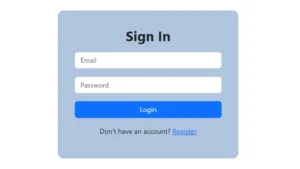
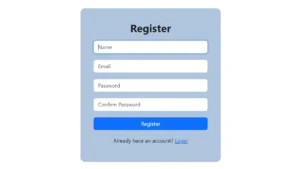
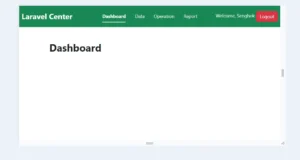

Summary
You’ve now built a complete Laravel 12 Vue 3 Session Based Authentication system from scratch — including backend API setup, frontend SPA configuration, secure login/logout flow, and Bootstrap UI integration.
Your app now uses Sanctum session to handle user sessions safely and efficiently between Laravel and Vue 3.
If you’d like to explore an alternative authentication approach, check out my related guide on
👉 Laravel 12 Vue 3 Token Based Authentication – Complete SPA Tutorial for Beginners
to learn how to implement secure token-based login instead of session.